An AI SDR can research an account, find a contact, guess their address and write a decent first line in the time it takes a human to open LinkedIn. It can also send to 400 guessed addresses before anyone notices that a third of them bounce. The speed that makes agents useful is the same speed that burns sending domains.
Verification is one of the simplest guardrails to put between an agent and the send button. This post covers where it goes, how to expose it as a tool, and which decisions should stay in code rather than in a prompt.
Why agents make list quality worse
Human SDRs make bad-address mistakes slowly. Agents make them in parallel. A few failure modes come up again and again:
- Pattern guessing. The agent finds "Jane Doe, VP Sales at Acme" and constructs
[email protected]. It might be right. It might bejdoe@. It might be on a different domain entirely. - Stale enrichment data. The agent trusts a database record that was accurate when collected and has since decayed.
- Hallucinated details. Language models can produce a plausible address that appears in no source at all, particularly when asked to "find" an email.
- No memory of bounces. Unless you wire bounce data back in, the agent will happily try the same dead address in next week's run.
Each of these turns into hard bounces, and hard bounces from cold domains damage reputation fast.
Where verification belongs in the pipeline
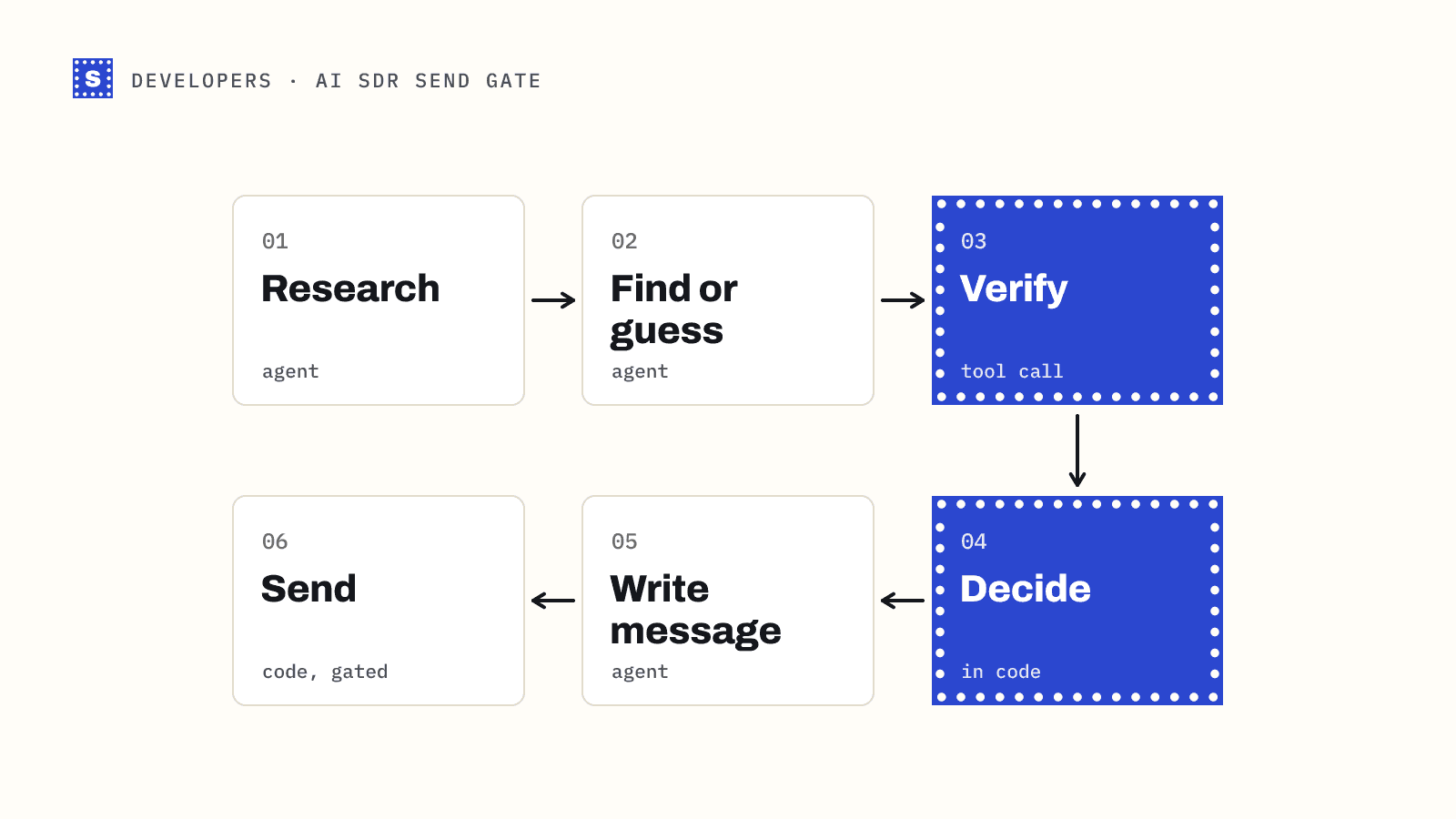
Put the check as close to the send as possible, after all the research and generation is done:
research → find or guess address → verify → decide → write message → send
Verifying before writing the message saves model tokens on contacts you'll drop anyway. Verifying immediately before the send, not hours earlier in a batch job, keeps results fresh.
Keep the decision in code, not in the prompt
It's tempting to give the agent a verify tool and write "only send to valid addresses" in the system prompt. Don't rely on that alone. Models skip steps, misread results, and can be talked into things by content in a scraped page. The send decision should be enforced by deterministic code the agent can't bypass.
A clean split:
| Responsibility | Where it lives |
|---|---|
| Finding candidate addresses | Agent |
| Calling verification | Agent tool, or your pipeline |
| Deciding send / skip / hold | Code |
| Sending | Code, gated on the decision |
| Recording bounces back to the contact | Code |
The agent can still call the tool to choose between candidate addresses. But the final send path should check the result again and refuse anything that doesn't pass.
A verification tool for the agent
Here's a tool definition in the common JSON-schema style most agent frameworks use:
{
  "name": "verify_email",
  "description": "Check whether an email address can receive mail. Returns a category (deliverable, risky, undeliverable, or pending while a slow server is still being checked) and a reason. Use it to choose between candidate addresses. Do not send to anything that is not deliverable.",
  "input_schema": {
    "type": "object",
    "properties": {
      "email": { "type": "string", "description": "The address to check" }
    },
    "required": ["email"]
  }
}
And the handler behind it, calling the SimpleCold single endpoint:
export async function verifyEmail({ email }) {
  const res = await fetch(
    `https://simplecold.com/api/v1/api-validation/single?email=${encodeURIComponent(email)}`,
    { headers: { Authorization: `Bearer ${process.env.SIMPLECOLD_API_KEY}` } },
  );
  // 'error' is our own marker, not an API category: the check didn't happen
  if (res.status === 429) return { category: 'error', reason: 'rate limited, try later' };
  if (!res.ok) return { category: 'error', reason: `verification error ${res.status}` };
  const { payload } = await res.json();
  return {
    email: payload.email,
    category: payload.category,
    status: payload.status,
    reason: payload.statusMessage,
    suggestion: payload.suggestion,
  };
}
Return a short, structured result. The agent needs the category and the reason, not every field in the response. Note that the API's own categories are only deliverable, risky, undeliverable and pending. The error value above is something the handler invents so the agent can tell "the check failed" apart from "the address is risky".
The send gate
This is the part that matters most. Before any message leaves, run the gate:
const SEND = 'send';
const SKIP = 'skip';
const HOLD = 'hold';

export function decide(result) {
  switch (result.category) {
    case 'deliverable':
      return SEND;
    case 'undeliverable':
      return SKIP;
    case 'risky':
      // catch-all, role-based, disposable, blocked by server, no response
      if (result.status === 'disposable') return SKIP;
      if (result.status === 'role_address') return SKIP; // 1:1 outreach to info@ rarely helps
      return HOLD; // review or route to a throttled campaign
    case 'pending': // still checking a slow server
    case 'error': // our handler couldn't reach the API
    default:
      return HOLD;
  }
}
HOLD means the contact goes to a queue that a human reviews or that a slower, throttled campaign handles. For catch-all domains, that second campaign should send small volumes from your healthiest mailboxes and stop automatically if bounces rise.
Choosing between candidate addresses
Agents often end up with two or three guesses for one person: jane.doe@, jdoe@, jane@. Verifying each candidate and keeping the one that comes back deliverable is a reasonable use of the tool, with two caveats.
First, every candidate check costs a credit. If the agent routinely tries five patterns per contact, verification spend grows fivefold. Have it try the most common pattern for the company first and stop at the first deliverable answer.
Second, catch-all domains defeat this approach. On a domain that accepts every address, every guess comes back risky with the status accept_all, so verification can't tell you which pattern is right. When the first candidate comes back accept_all, the agent should stop guessing on that domain, record that it's catch-all, and either look for the address in a public source or route the contact to the throttled campaign. Burning credits on the remaining guesses tells you nothing new.
Watch the suggestion field too. If a scraped address has a typo in a common provider's domain, the result is undeliverable with the status possible_typo and a corrected address in suggestion. An agent should treat the suggestion as a new candidate to verify, not as an address to send to directly.
Test the agent before it touches real contacts
Before connecting the agent to live prospects, run it against SimpleCold's test addresses. On the single and batch endpoints they return fixed results and don't use credits. [email protected] is deliverable, [email protected] is a catch-all, [email protected] is disposable and [email protected] is a missing mailbox. Feed those into the pipeline and check that the gate sends, holds and skips the way you expect. The test emails guide has the full list.
Feed bounces back in
Verification lowers bounces. It doesn't remove them, especially on catch-all domains. Wire your sequencer's bounce webhook or export back into the contact record, and add a hard rule: an address that hard-bounced is never sent to again by any agent. Without this, each run starts with the same mistakes.
Rate limits and cost
Agents can generate far more verification calls than a human workflow. A few habits keep this sane:
- Cache results per address for a reasonable period, so the agent doesn't re-verify the same contact every run.
- Use the batch endpoint when the agent has several candidates at once. It takes up to 50 addresses per request.
- Back off on HTTP 429 instead of retrying immediately: wait for the seconds in the
Retry-Afterheader. The single endpoint allows 100 requests a minute per API key, and 300 a minute across your organization, so extra keys don't raise the ceiling. - Verify only addresses the agent actually intends to contact.
The error handling and rate limits guide has retry code you can reuse.
What to log
For every send decision, log the address, category, status, reason and the decision. When a campaign underperforms, you'll be able to tell whether it was the list, the copy or the infrastructure. It also gives you an audit trail of why the agent contacted someone, which helps if a recipient asks.
Summary of the rules
- Verify after research, before writing and sending.
- Enforce send rules in code, not only in the prompt.
- Send only deliverables automatically; hold risky, pending and failed checks.
- Never send to an address that has hard-bounced before.
- Respect rate limits and cache results.
The email verification API page covers the single, batch and bulk endpoints, and the developers solution page shows how teams build it into products. If you're running outbound with or without agents, the cold email page covers the list side.