Email validation in PHP usually starts and ends with filter_var(). That's a reasonable start. It's also only the first of three layers you need if the address actually matters: format, domain, and mailbox.
This post goes through each layer in plain PHP, then shows the Laravel equivalents, then covers how to call a verification API for the mailbox check.
Layer 1: format with filter_var
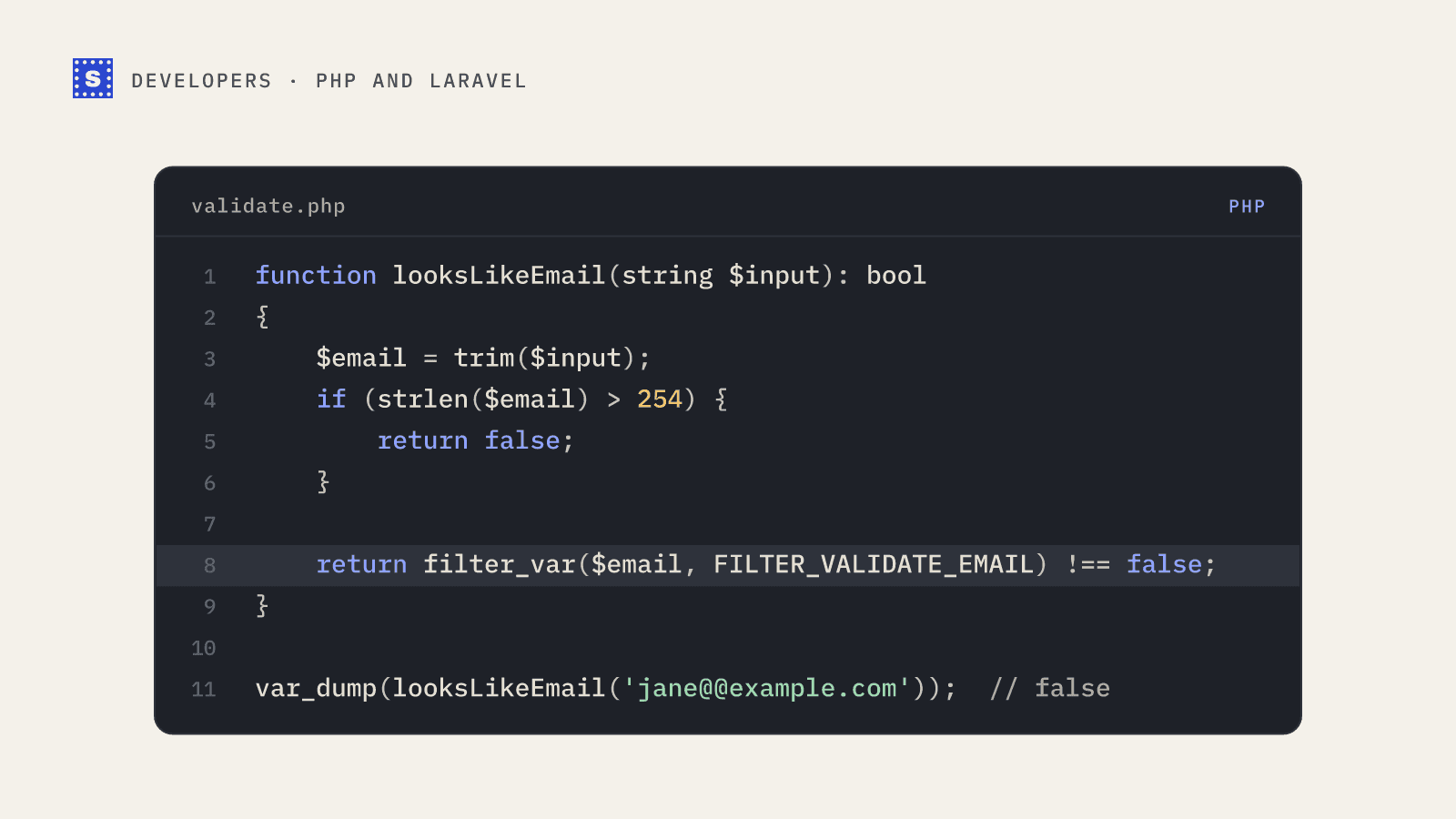
PHP's built-in filter is better than most hand-written regexes:
<?php

function looksLikeEmail(string $input): bool
{
    $email = trim($input);

    if (strlen($email) > 254) {
        return false;
    }

    return filter_var($email, FILTER_VALIDATE_EMAIL) !== false;
}

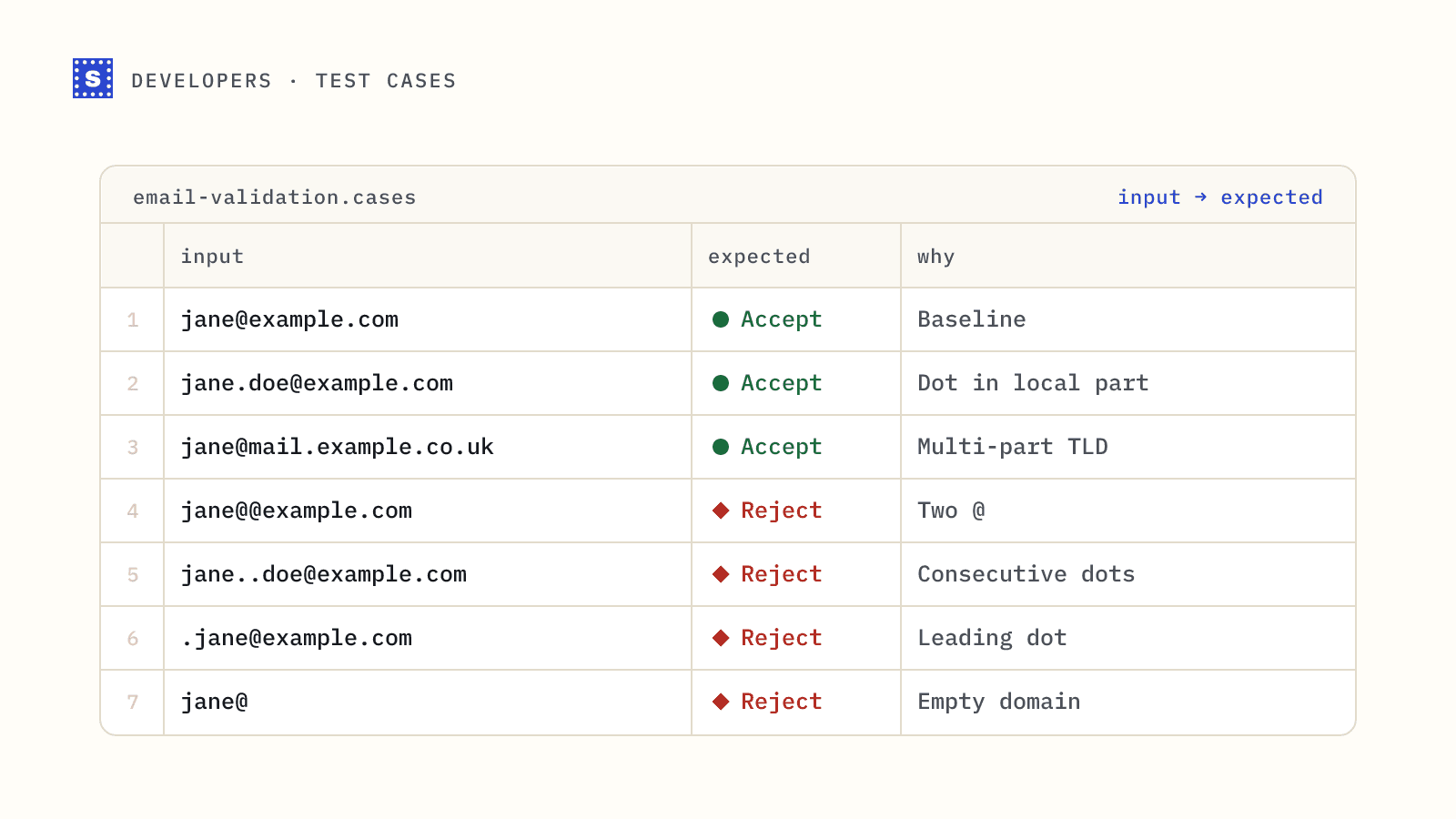
var_dump(looksLikeEmail('[email protected]'));   // true
var_dump(looksLikeEmail('jane@@example.com'));  // false
var_dump(looksLikeEmail('[email protected]')); // true
A few things worth knowing about FILTER_VALIDATE_EMAIL:
- It doesn't accept internationalized (unicode) local parts by default. Pass
FILTER_FLAG_EMAIL_UNICODEif you need them. - It accepts some technically valid but unusual forms, such as IP-literal domains in brackets. If that matters to you, add your own checks.
- It doesn't trim. Always trim first, since copy-paste regularly brings trailing spaces.
If you'd rather use a regex, see our email validation regex post for a pattern that accepts plus signs and apostrophes.
Layer 2: does the domain receive mail?
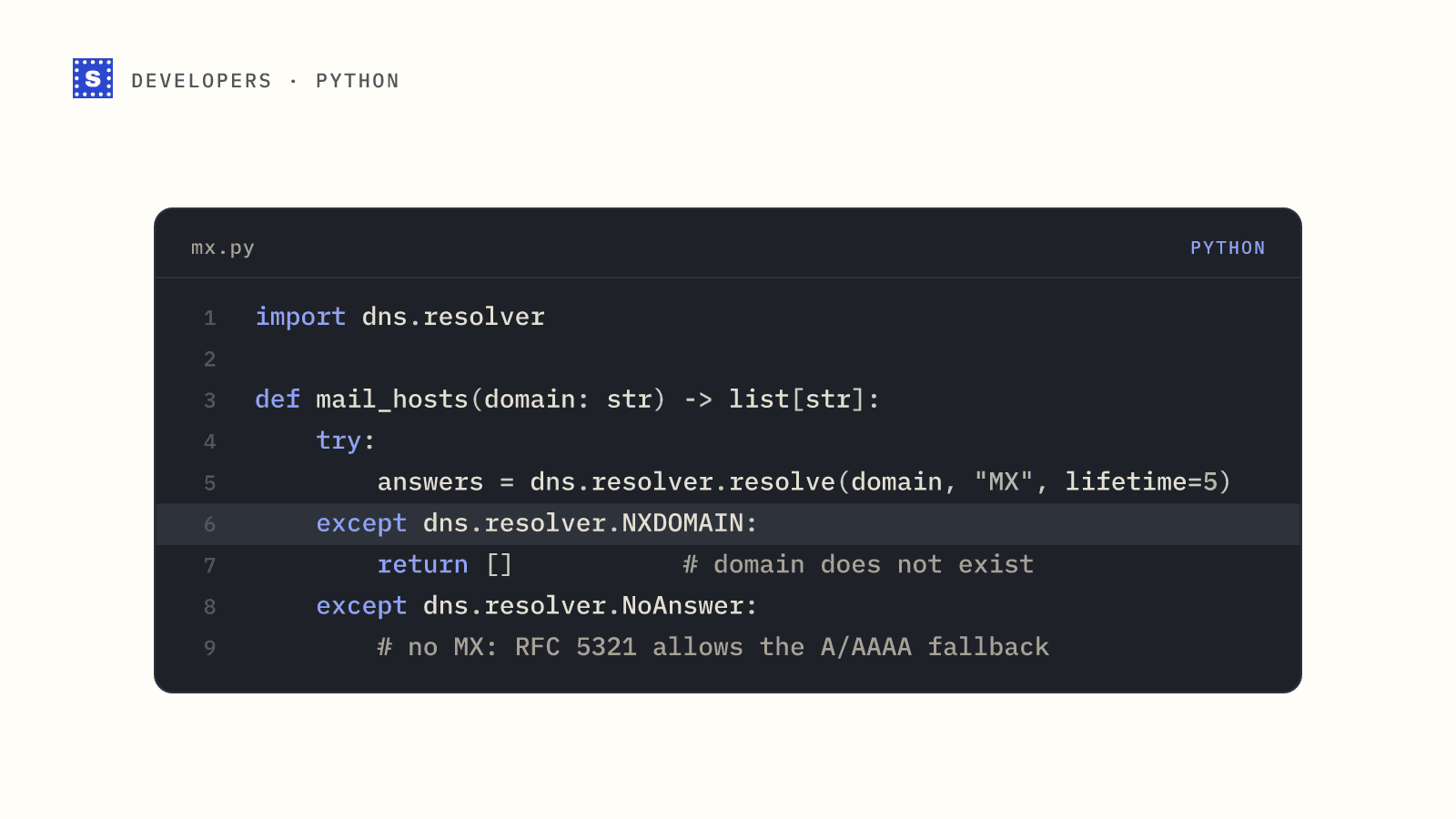
A well-formed address on a domain with no mail server will bounce. PHP can check DNS directly:
<?php

function domainAcceptsMail(string $email): bool
{
    $domain = strtolower(substr(strrchr($email, '@'), 1));
    if ($domain === '') {
        return false;
    }

    // Convert internationalized domains to ASCII if the intl extension is available
    if (function_exists('idn_to_ascii')) {
        $ascii = idn_to_ascii($domain, IDNA_DEFAULT, INTL_IDNA_VARIANT_UTS46);
        if ($ascii !== false) {
            $domain = $ascii;
        }
    }

    if (checkdnsrr($domain, 'MX')) {
        $records = dns_get_record($domain, DNS_MX) ?: [];
        // RFC 7505 null MX: a single record pointing at "." means "no mail"
        foreach ($records as $mx) {
            if (($mx['target'] ?? '') !== '' && $mx['target'] !== '.') {
                return true;
            }
        }
        return false;
    }

    // No MX: SMTP falls back to the A or AAAA record
    return checkdnsrr($domain, 'A') || checkdnsrr($domain, 'AAAA');
}
Two cautions. DNS lookups are slow compared with string checks, so don't run them on every keystroke. And a domain with valid MX records tells you nothing about whether the specific mailbox exists.
You can sanity-check any domain by hand with the MX lookup tool.
Layer 3: does the mailbox exist?
This is the SMTP check: connect to the domain's mail server, start a delivery, name the recipient, and read the response code. You can write it in PHP with fsockopen(). We don't recommend running it from your own servers in production, for practical reasons:
- Many cloud hosts block outbound port 25 by default.
- Mail servers rate-limit and block IPs that probe many addresses, and your web server's IP may end up on a blocklist.
- Greylisting, catch-all domains and anti-spam systems all need handling, retries and state.
- A web request waiting on a slow mail server makes for a slow signup form.
That's the part a verification API handles. Our post on how SMTP verification works explains the protocol if you're curious.
Calling a verification API from PHP
Here's a single-address check against the SimpleCold email verification API using cURL:
<?php

function verifyEmail(string $email, string $apiKey): array
{
    $url = 'https://simplecold.com/api/v1/api-validation/single?email=' . rawurlencode($email);

    $ch = curl_init($url);
    curl_setopt_array($ch, [
        CURLOPT_RETURNTRANSFER => true,
        CURLOPT_HTTPHEADER => ['Authorization: Bearer ' . $apiKey],
        CURLOPT_TIMEOUT => 20,
    ]);

    $body = curl_exec($ch);
    $status = curl_getinfo($ch, CURLINFO_HTTP_CODE);
    curl_close($ch);

    if ($body === false || $status !== 200) {
        throw new RuntimeException("Verification request failed with HTTP $status");
    }

    $json = json_decode($body, true);
    return $json['payload'];
}

$result = verifyEmail('[email protected]', getenv('SIMPLECOLD_API_KEY'));

switch ($result['category']) {
    case 'deliverable':
        // accept
        break;
    case 'undeliverable':
        // reject, and show $result['suggestion'] if there is one
        break;
    case 'pending':
        // status is "processing": accept now, check again later
        break;
    default:
        // risky (catch-all, role-based, disposable, no response...): accept, maybe flag for review
}
The payload includes status (a specific code such as mailbox_found, mailbox_not_found or accept_all), statusMessage (a plain explanation), category and suggestion for likely typos. There are three categories plus pending; a server that won't confirm the address comes back risky with the status no_response. When a mail server is slow, the response comes back within about 12 seconds with status processing. The finished result is usually ready within a minute or two, and you can collect it any time in the next 30 minutes without using another credit. The handling processing results guide shows the retry pattern.
When the API says no
The function above throws on any non-200 response. In practice you'll want to tell the cases apart, because they call for different reactions:
| HTTP status | Typical message | What to do |
|---|---|---|
| 400 | A format error for the email field | Treat the address as invalid |
| 400 | Insufficient credits. | Stop and alert someone; retrying won't help |
| 401 | Invalid API key, API key is inactive | Fix the configuration, alert |
| 429 | Rate limit exceeded | Wait for the Retry-After seconds, then retry; the single endpoint allows 100 calls a minute per key |
| 5xx | Internal Server Error | Retry with backoff, or fail open |
Error bodies carry the text in message. Rate-limit responses also repeat it in error for older integrations, and add code: "RATE_LIMITED" with details such as retryAfterSeconds in data. Read $json['message'] ?? $json['error'] to cover every shape. The error handling guide lists every message.
Collecting a pending result later
In Laravel, the natural place for the follow-up is a queued job dispatched with a delay. The job calls the result endpoint and stores whatever comes back:
$url = 'https://simplecold.com/api/v1/api-validation/single/result?email=' . rawurlencode($email);
// 200 with status "processing": release the job back to the queue for another minute
// 200 with any other status: save category, status and statusMessage on the user
// 404 "No check in progress for this email.": already collected, or the 30 minutes ran out
Collecting the result is free. Once you've read a finished result, the endpoint returns 404 for that address, so save it the first time.
Laravel
Laravel's email validation rule takes options that map onto the layers above:
$request->validate([
    'email' => ['required', 'string', 'max:254', 'email:rfc,dns'],
]);
| Option | What it checks |
|---|---|
rfc | Format according to the RFC (the default) |
strict | RFC format, rejecting some warnings |
dns | The domain has a valid MX record |
spoof | Unicode characters that could be used to spoof |
filter | PHP's filter_var |
email:rfc,dns is a reasonable default for signup forms. To add a mailbox check, wrap the API call in a custom rule:
<?php

namespace App\Rules;

use Closure;
use Illuminate\Contracts\Validation\ValidationRule;

class DeliverableEmail implements ValidationRule
{
    public function validate(string $attribute, mixed $value, Closure $fail): void
    {
        try {
            $result = verifyEmail($value, config('services.simplecold.key'));
        } catch (\Throwable $e) {
            return; // fail open if the API is unreachable
        }

        if ($result['category'] === 'undeliverable') {
            $hint = $result['suggestion'] ? " Did you mean {$result['suggestion']}?" : '';
            $fail("This email address can't receive mail.$hint");
        }
    }
}
Storing what you learn
Whatever the API returns, save it next to the user or contact record: the category, the status, the statusMessage and the date you checked. That costs one migration and pays off quickly.
It stops you paying twice. If the same person signs up again, logs in, or edits their profile without changing the address, you already know the answer and don't need another call. Re-verify when the address changes, or before a campaign to contacts you checked months ago.
It also makes support easier. When someone asks why their account was flagged, the stored reason ("This mailbox does not exist.") answers the question without anyone re-running a check. And it lets you report on sign-up quality over time, for example how many disposable addresses arrive from a particular landing page.
Keep the raw address the person typed, too. Normalising for comparison (trimming, lowercasing the domain) is fine, but send to the version they gave you.
Which layers to use where
| Situation | Format | DNS | Mailbox (API) |
|---|---|---|---|
| Newsletter signup | Yes | Yes | Yes, or confirmation email |
| Account signup | Yes | Yes | Yes |
| Checkout | Yes | Yes | Yes, with typo suggestions |
| Internal admin form | Yes | Optional | No |
| Importing a CSV | Yes | Yes | Yes, in bulk |
For CSV imports, use a bulk job instead of looping over single calls; the bulk job guide shows how. For a few dozen addresses at a time, the batch endpoint (POST /api-validation/batch with a JSON body of up to 50 addresses) sits in between.
While you build and test, use SimpleCold's test addresses instead of real ones. On the single and batch endpoints they return fixed results without using credits: [email protected] is deliverable, [email protected] is a missing mailbox and [email protected] is a catch-all. That lets you cover every branch of the switch above in a PHPUnit test. And if you're building in another language, we've covered JavaScript and Python too.