Most bad addresses enter a database through a form. Someone types gmial.com, a bot fills in a throwaway inbox, or a person mistypes their own name. Catching these at the moment of sign-up costs one API call and saves you from sending a confirmation email into the void.
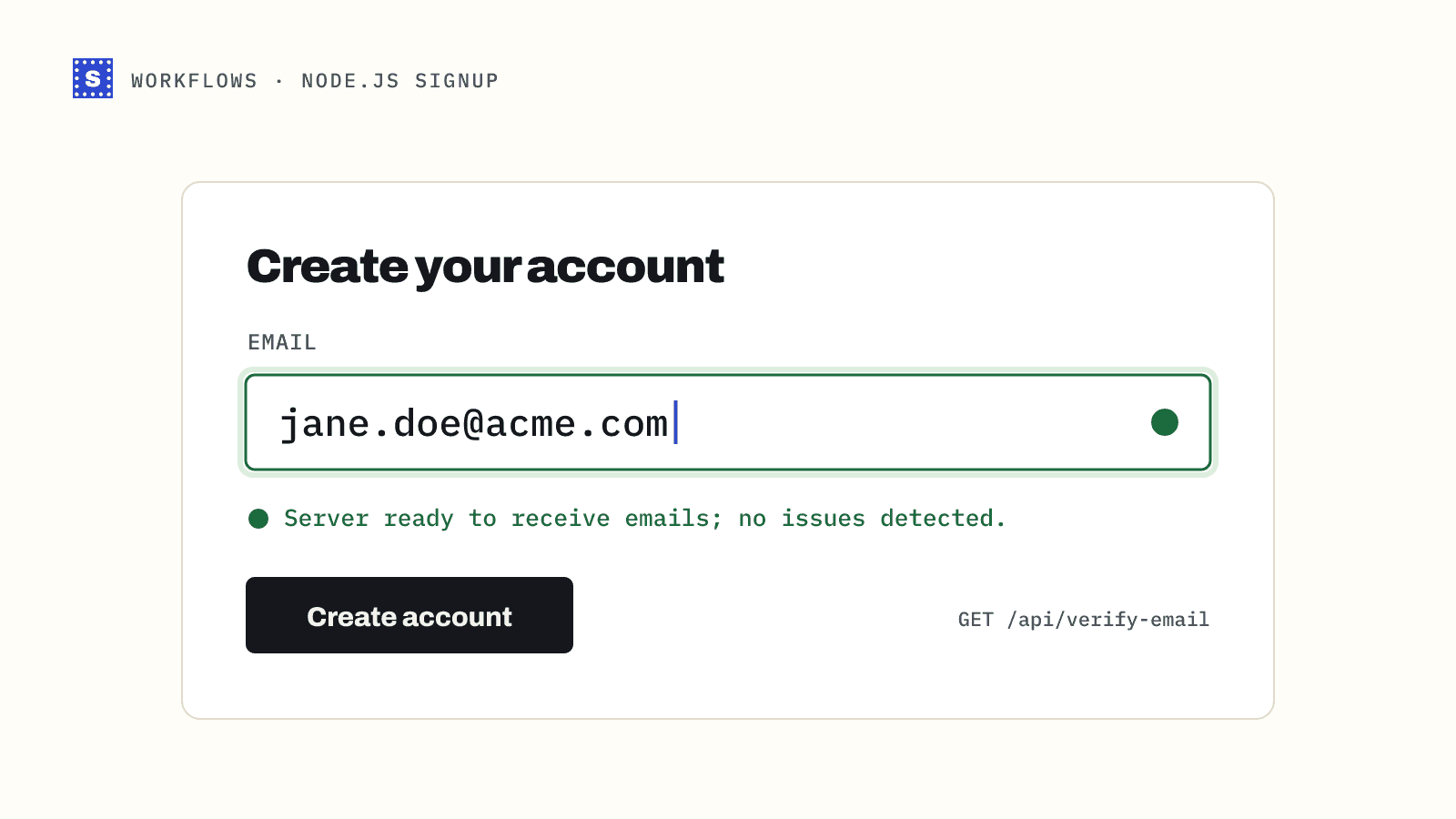
In this guide you will build a small Express server that verifies an address when the email field loses focus, shows a "did you mean" suggestion, blocks clearly bad addresses, and handles slow mail servers without making the user wait. The API key stays on the server the whole time.
What you will build
GET /api/verify-email?email=...on your server, which calls SimpleCold and returns a trimmed result.- A few lines of browser JavaScript that call that route on blur and show a message under the field.
- A check in your real sign-up handler, because client-side checks can be skipped.
Before you start
You need Node.js 18 or later and an API key from the dashboard (the quickstart covers creating one). Install Express:
npm init -y
npm install express
export SIMPLECOLD_API_KEY="your-key"
Never call the SimpleCold API directly from the browser. Anyone could open dev tools, copy your key and spend your credits.
The server route
// server.mjs
import express from "express";

const app = express();
app.use(express.json());
app.use(express.static("public"));

const API = "https://simplecold.com/api/v1";
const KEY = process.env.SIMPLECOLD_API_KEY;

async function callSimpleCold(path) {
  const res = await fetch(`${API}${path}`, {
    headers: { Authorization: `Bearer ${KEY}` },
    signal: AbortSignal.timeout(20_000), // the API answers within ~12 s
  });
  const body = await res.json().catch(() => ({}));
  return { ok: res.ok, status: res.status, body };
}

export async function verifyEmail(email) {
  const q = `?email=${encodeURIComponent(email)}`;
  const r = await callSimpleCold(`/api-validation/single${q}`);
  if (!r.ok) {
    // 400 for a malformed address, 429 for rate limits, 401 for key problems
    return { error: r.body.message ?? r.body.error ?? "verification failed", httpStatus: r.status };
  }
  return r.body.payload;
}

app.get("/api/verify-email", async (req, res) => {
  const email = String(req.query.email ?? "").trim();
  if (!email) return res.status(400).json({ error: "email is required" });

  try {
    const result = await verifyEmail(email);
    if (result.error) {
      // Treat a 400 from the API as "this is not a valid address".
      if (result.httpStatus === 400) {
        return res.json({ verdict: "block", message: "That doesn't look like a valid email address." });
      }
      // Anything else is our problem, not the user's. Let them continue.
      return res.json({ verdict: "allow", message: null });
    }
    res.json(toVerdict(result));
  } catch {
    // Network error or timeout: fail open.
    res.json({ verdict: "allow", message: null });
  }
});

function toVerdict(r) {
  if (r.suggestion) {
    return { verdict: "suggest", suggestion: r.suggestion, message: `Did you mean ${r.suggestion}?` };
  }
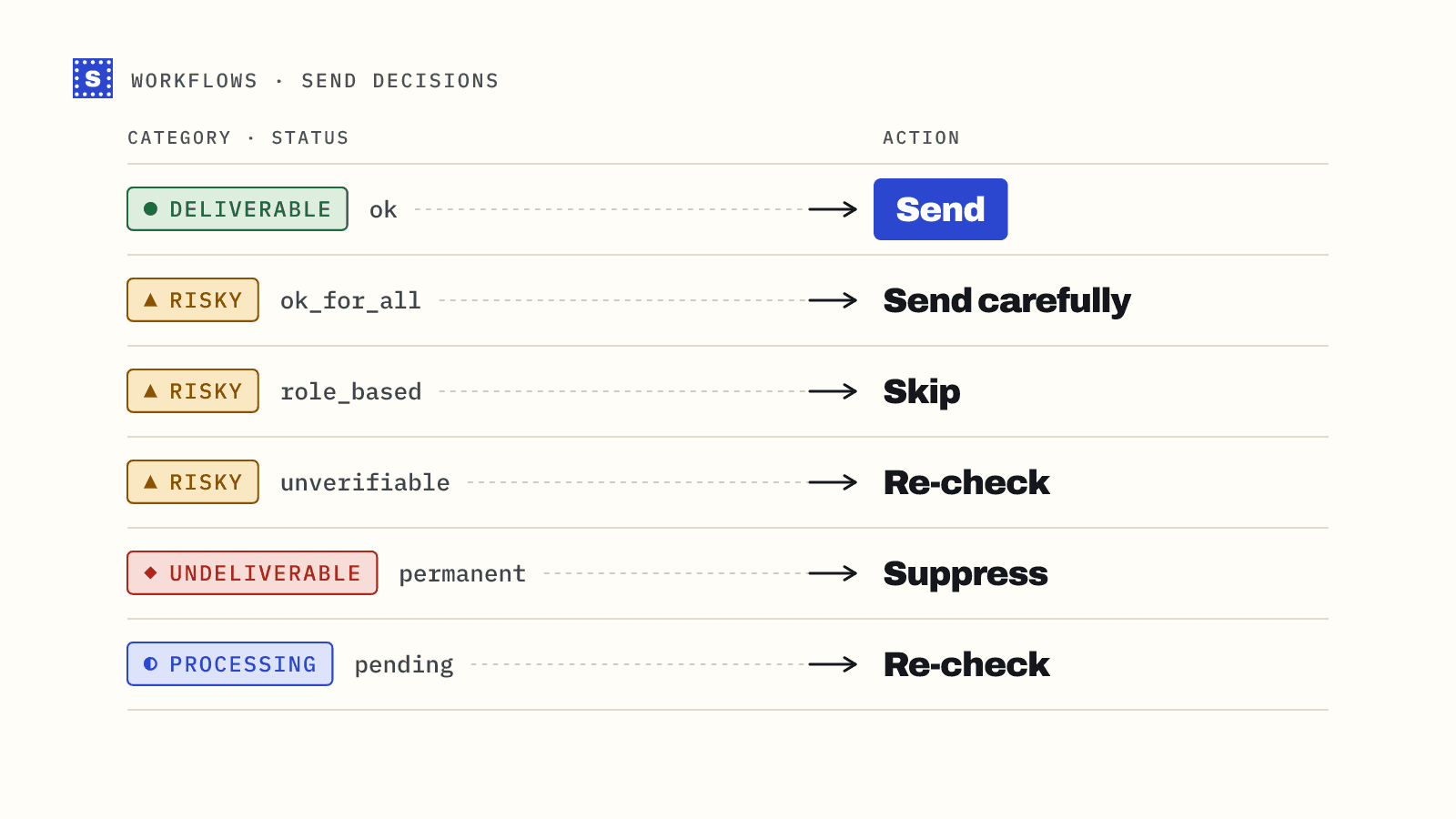
  switch (r.category) {
    case "undeliverable":
      return { verdict: "block", message: "We couldn't find that mailbox. Please check the address." };
    case "risky":
      if (r.status === "disposable") {
        return { verdict: "block", message: "Please use a permanent email address." };
      }
      return { verdict: "allow", message: null };
    case "pending": // status "processing": the mail server is slow
    case "deliverable":
    default:
      return { verdict: "allow", message: null };
  }
}

app.listen(3000, () => console.log("http://localhost:3000"));
A few decisions in that code are worth explaining.
Fail open. If SimpleCold is unreachable, your rate limit is hit, or the key is wrong, the user can still sign up. A verification outage should never become a sign-up outage. Log these cases and alert on them instead.
Suggestions first. When the domain looks misspelled, the result carries a suggestion such as [email protected]. Showing it before anything else fixes the mistake at the cheapest possible moment, while the person is still looking at the field.
What to block. This example blocks undeliverable addresses and disposable inboxes, and lets everything else through. Catch-all domains (accept_all), role addresses like support@, and anti-spam responses come back risky. For a sign-up form these are usually real people at real companies, so blocking them would cost you customers. Your product may differ. A B2B tool that only wants work addresses might reject role_address too. The category mapping guide lists every status so you can choose.
The browser side
Put this in public/index.html. It calls your route when the field loses focus, not on every keystroke, so you spend one credit per address rather than one per character.
<form id="signup" method="post" action="/signup">
  <label for="email">Work email</label>
  <input id="email" name="email" type="email" required autocomplete="email" />
  <p id="email-hint" aria-live="polite"></p>
  <button type="submit">Create account</button>
</form>

<script>
  const input = document.getElementById("email");
  const hint = document.getElementById("email-hint");
  let lastChecked = "";

  input.addEventListener("blur", async () => {
    const email = input.value.trim();
    if (!email || email === lastChecked || !input.checkValidity()) return;
    lastChecked = email;
    hint.textContent = "";

    const res = await fetch("/api/verify-email?email=" + encodeURIComponent(email));
    const v = await res.json();

    if (v.verdict === "suggest") {
      hint.innerHTML = "";
      const btn = document.createElement("button");
      btn.type = "button";
      btn.textContent = v.message;
      btn.onclick = () => {
        input.value = v.suggestion;
        hint.textContent = "";
        lastChecked = v.suggestion;
      };
      hint.appendChild(btn);
    } else if (v.verdict === "block") {
      hint.textContent = v.message;
      input.setCustomValidity(v.message);
    } else {
      input.setCustomValidity("");
    }
  });

  input.addEventListener("input", () => input.setCustomValidity(""));
</script>
The checkValidity() call skips the API for strings that obviously aren't addresses. The browser's built-in type="email" check is loose, but it filters out empty fields and text without an @, and those don't need a network round trip.
The suggestion is a button rather than an automatic replacement. People do have unusual domains, and silently rewriting someone's address is a worse failure than a bounce.
Check again on submit
The blur check is a convenience. Anyone can submit the form with JavaScript turned off or by posting directly, so the sign-up handler must verify too. To avoid paying twice for the same address, cache the last result per address for a few minutes:
// add to server.mjs
const recent = new Map(); // email -> { verdict, at }
const TEN_MINUTES = 10 * 60 * 1000;

async function cachedVerdict(email) {
  const key = email.toLowerCase();
  const hit = recent.get(key);
  if (hit && Date.now() - hit.at < TEN_MINUTES) return hit.verdict;
  const result = await verifyEmail(email);
  const verdict = result.error ? { verdict: "allow" } : toVerdict(result);
  recent.set(key, { verdict, at: Date.now() });
  return verdict;
}

app.post("/signup", express.urlencoded({ extended: false }), async (req, res) => {
  const email = String(req.body.email ?? "").trim();
  const v = await cachedVerdict(email).catch(() => ({ verdict: "allow" }));
  if (v.verdict === "block") return res.status(422).send(v.message);
  // A "suggest" verdict at this point means the user saw the hint and kept
  // their own spelling. Respect that.
  // ... create the account, send the confirmation email ...
  res.redirect("/welcome");
});
Then use cachedVerdict in the GET route as well, so blur and submit share the cache. In production, swap the Map for Redis or whatever cache you already run. An in-memory map grows forever and doesn't work across several server instances.
Handle slow mail servers
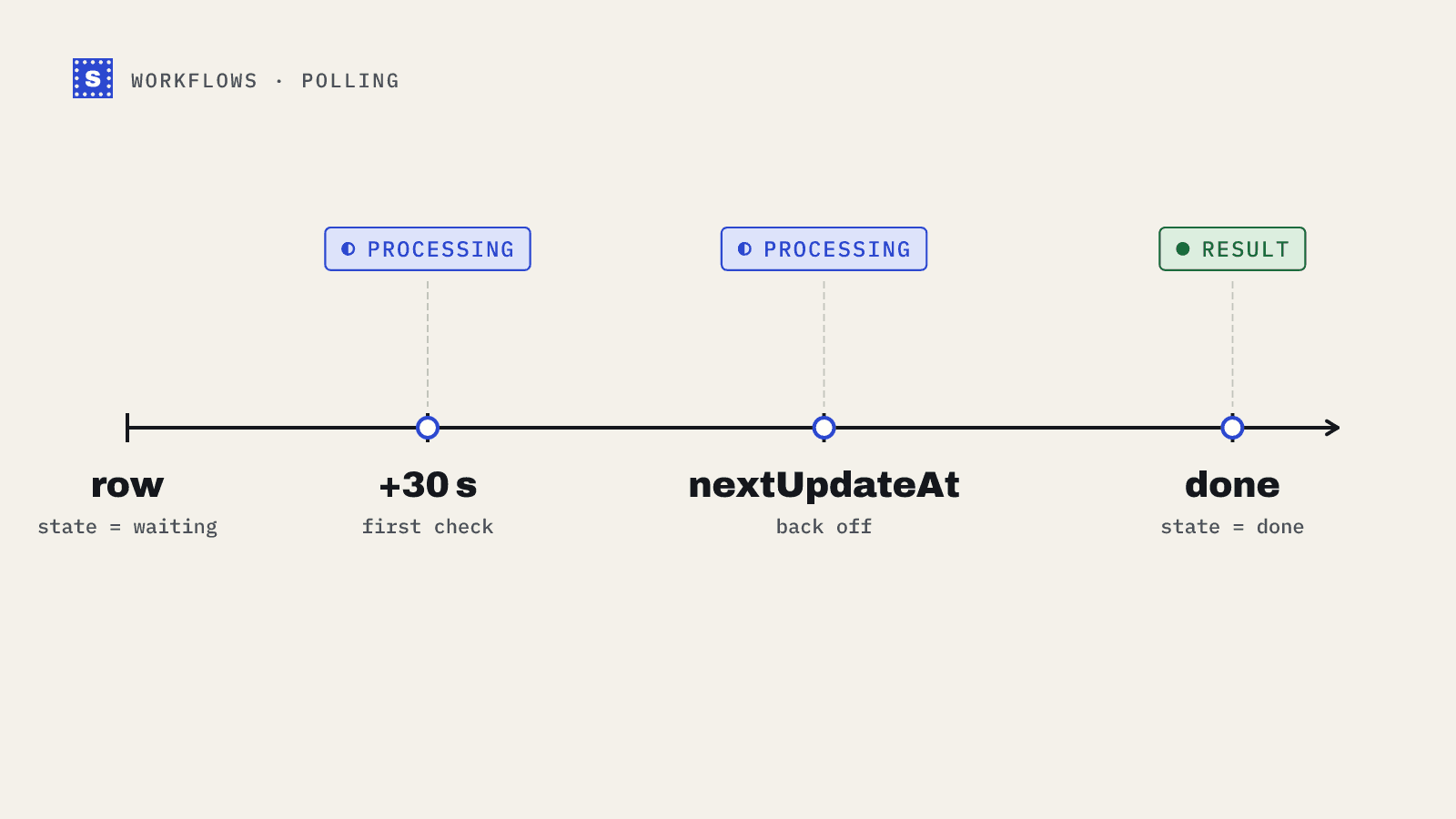
Some mail servers answer slowly, sometimes on purpose. The API waits about 12 seconds; if it still has no answer, it returns status: "processing" and category: "pending". A person filling a form shouldn't wait that long, and they don't need to. Let them sign up, then finish the check in the background.
async function finishPendingCheck(email, userId) {
  const q = `?email=${encodeURIComponent(email)}`;
  for (let attempt = 0; attempt < 10; attempt++) {
    await new Promise((r) => setTimeout(r, 30_000));
    const r = await callSimpleCold(`/api-validation/single/result${q}`);
    if (r.status === 404) return; // nothing pending any more
    if (!r.ok) continue;
    const result = r.body.payload;
    if (result.status === "processing") continue;
    // Store the final result against the user, e.g. flag undeliverable accounts.
    console.log("final result for", userId, result.category, result.status);
    return;
  }
}
Polling /api-validation/single/result does not use another credit, and the pending check stays collectable for 30 minutes. Most slow servers settle within about two minutes. The polling guide moves this into a table and a scheduled sweeper so it survives restarts.
Call finishPendingCheck without await from the sign-up handler when the verdict came from a pending result, so the response to the user isn't held up. While the form is open, show a neutral state ("We'll confirm this address shortly") rather than an error.
Rate limits on a busy form
The single endpoint allows 100 requests per minute per API key, and 300 per minute across your organization. For most sign-up forms that is plenty. If you run a big launch or get a burst of bot traffic, the API returns 429 and the code above fails open, which is the behaviour you want. Put your own per-IP limit on /api/verify-email as well. Without it, a bot can use your route to burn through your credits one address at a time.
Test it
Run node server.mjs, open http://localhost:3000, and type the free test addresses into the field:
[email protected]passes.[email protected]is blocked as a missing mailbox.[email protected]is blocked as disposable.[email protected]passes as a catch-all.
None of them use credits. The test email guide has the full list and a test suite you can adapt.
For the endpoint reference, see the API docs. For a product overview of checking addresses as they're typed, see real-time email verification.