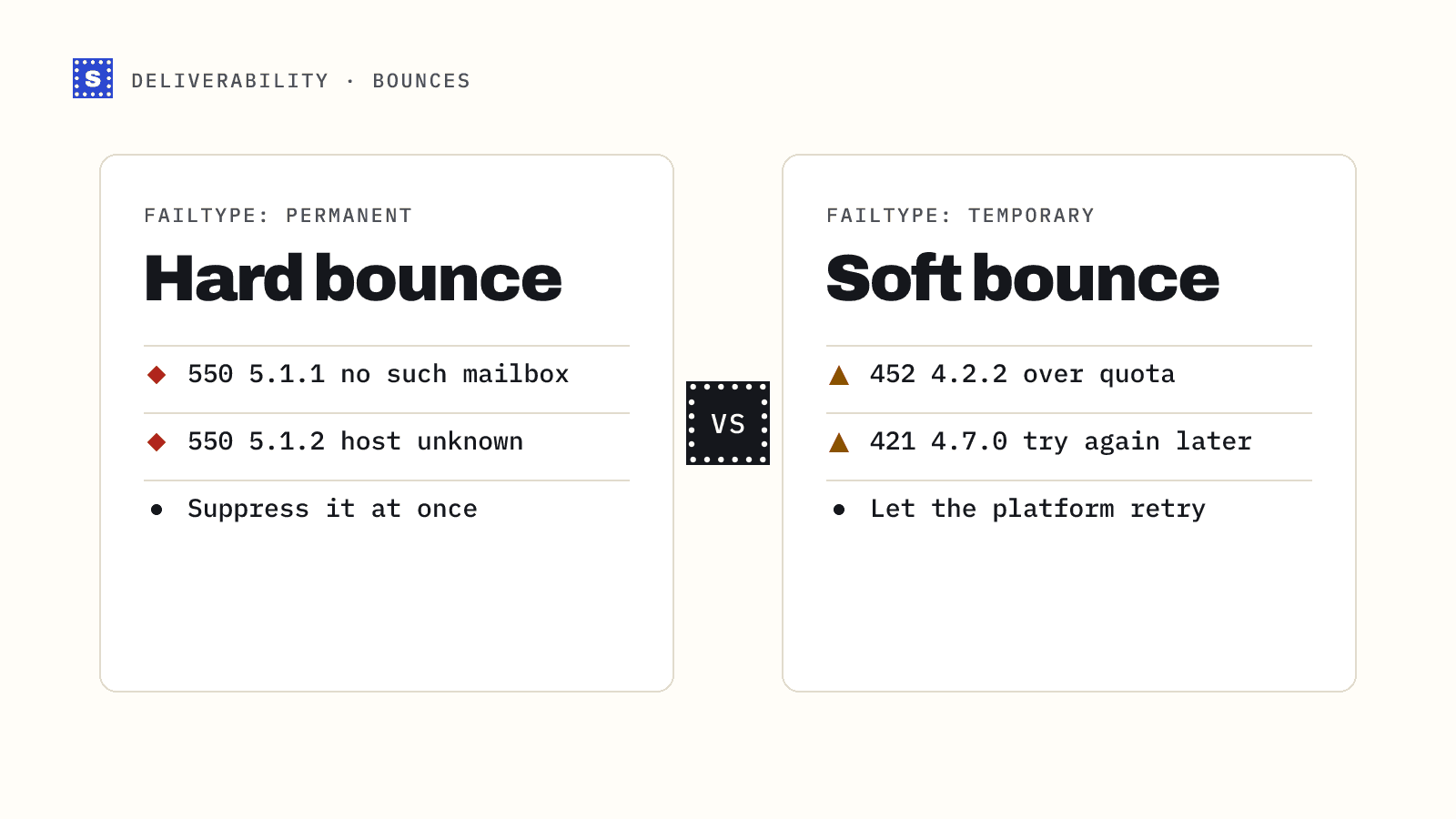
Every bounce notice falls into one of two groups. A hard bounce says the message can never be delivered to that address. A soft bounce says it could not be delivered right now. The difference decides what you do next: one address goes on your suppression list today, the other gets another chance.
Most sending tools sort bounces for you, but they do it with their own rules, and those rules are not always visible. If you understand what sits underneath, you can read the raw notices, catch the cases your tool gets wrong, and fix the cause instead of only cleaning up after it.
What a hard bounce is
A hard bounce is a permanent failure. The receiving server, or something before it, has decided the message cannot be delivered and that trying again will not change the answer.
Common causes:
- The mailbox does not exist. Someone left the company, the address was mistyped, or it was never real.
- The domain does not exist, or it has no mail servers.
- The domain publishes a null MX record (RFC 7505), which is an explicit statement that it accepts no mail.
- The receiving server has refused your mail permanently because of a policy decision, such as an authentication failure or a block on your sending domain.
In SMTP terms, hard bounces usually come back with a 5xx reply code. You will often see an enhanced status code next to it, defined in RFC 3463. The one you will see most is 5.1.1, which means the mailbox does not exist. 5.1.2 points to a bad destination domain. Codes in the 5.7.x range are policy and security rejections.
What a soft bounce is
A soft bounce is a temporary failure. The server is saying "not now" rather than "never".
Typical causes:
- The mailbox is full.
- The receiving server is down, overloaded, or timing out.
- The message is too large for the recipient's limits.
- The server is greylisting you, which means it refuses the first attempt from an unfamiliar sender and expects a retry a few minutes later.
- You are being rate limited because you sent too much, too fast, to one provider.
Soft bounces usually carry a 4xx reply code, such as 421 or 450, and enhanced codes beginning with 4.. Your sending server will normally retry them on its own over a period of hours or days before giving up.
Hard bounce vs soft bounce at a glance
| Hard bounce | Soft bounce | |
|---|---|---|
| Meaning | Permanent failure | Temporary failure |
| Typical SMTP reply | 5xx | 4xx |
| Typical enhanced code | 5.1.1, 5.1.2, 5.7.x | 4.2.2, 4.4.x, 4.7.x |
| Retry? | No | Yes, with spacing |
| Suppress? | Immediately | After repeated failures |
| Preventable by verification? | Mostly | Partly |
The codes are a guide, not a law. Some servers return a 5xx for a full mailbox (5.2.2), and some return a 4xx for things that will never succeed. Read the text that comes with the code. It usually tells you more than the number does.
Why the difference matters for deliverability
Mailbox providers watch how you treat addresses that do not exist. A sender who keeps mailing dead addresses looks like someone working from an old or bought list, and that is how spam operations behave. High hard bounce rates can push your mail toward the spam folder or get it rejected outright.
Soft bounces are less damaging on their own, but they are still a signal. A sudden spike in 421 or 4.7.x deferrals from one provider often means that provider is throttling you. That is an early warning about your reputation, and it deserves attention before it turns into blocks.
There is no published bounce threshold from Gmail or Yahoo. Their 2024 sender rules set a spam complaint threshold, not a bounce threshold. The common advice to keep bounces under 2% is an industry rule of thumb, and many cold email teams aim far lower than that.
What to do with each kind
Hard bounces
- Suppress the address at once. Do not send to it again from any tool, campaign or sequence.
- Push the suppression into every system that can send. If you suppress in your sequencer but the address still sits in your CRM, someone will re-import it next quarter.
- Look for patterns. Ten hard bounces from one company may mean a domain migration. A batch of
5.1.1errors from one lead source tells you that source is stale. - Check whether any were policy rejections (
5.7.x). Those are not bad addresses. They are a problem with your setup or reputation, and suppressing the contact will hide the real issue.
Soft bounces
- Let your sending platform retry. That is normal and expected.
- If the same address soft bounces across several separate sends, treat it as dead. A mailbox that has been full for weeks is usually abandoned.
- If soft bounces cluster around one provider, slow down. Spread sends across more hours and lower your daily volume to that provider until the deferrals stop.
- If the reason mentions message size, check your attachments and images.
How to prevent hard bounces before you send
Most hard bounces come from addresses that were already dead when you loaded them. That makes them the most preventable kind of deliverability problem.
Email verification checks an address before you send to it. A verifier confirms the syntax, looks up the domain's MX records, and asks the mail server whether the mailbox exists, all without delivering a message. Addresses with missing mailboxes, dead domains or broken syntax come back as undeliverable, and you remove them before they cost you anything.
Verification will not catch everything. A mailbox can be deleted the day after you check it. Catch-all domains accept every address at the SMTP stage, so a verifier cannot confirm a specific person there. Soft bounces caused by throttling or a full mailbox depend on the moment you send, so no pre-send check can predict them reliably.
A practical routine looks like this:
- Verify every new list before its first send.
- Re-verify older segments before you mail them again, especially B2B contacts more than a few months old.
- Verify at the point of capture on signup forms, so typos and fake addresses never enter the list.
- Keep a single suppression list that every sending tool reads from.
Reading a bounce notice yourself
When a bounce looks odd, open the delivery status notification and find three things:
- The reply code, such as
550. - The enhanced status code, such as
5.1.1. - The diagnostic text from the receiving server.
The text often names the real cause in plain words: "mailbox unavailable", "user unknown", "message rejected due to policy". If you see a reference to authentication, SPF or DMARC, check your DNS records before you blame the address. Our SMTP bounce code reference covers the common codes one by one.
Where SimpleCold fits
SimpleCold checks each address before you send and returns a category with a plain reason, such as "This mailbox does not exist" or "This domain can't receive email". Results also carry a fail type (permanent, temporary or none), which maps neatly onto the hard and soft split above. You can try a single address with the free email checker, or upload a CSV to the bulk email verifier before your next campaign.
If you already have bounces, start with the hard ones. Suppress them everywhere today, then verify the rest of the list so the next send does not produce the same report. The bounce rate calculator is a quick way to see where you stand.