A bounce message is the receiving server telling you exactly why it refused your email. Most people skim past the code and read the friendly text, which is a shame, because the code is more reliable. Once you can read 550 5.1.1 at a glance, you know whether to delete the contact, wait and retry, or fix something in your own setup.
How to read an SMTP reply
A typical rejection looks like this:
550 5.1.1 <[email protected]>: Recipient address rejected: User unknown
It has three parts:
- Basic reply code (
550): three digits defined in RFC 5321. The first digit is what matters most.2means accepted,4means temporary failure,5means permanent failure. - Enhanced status code (
5.1.1): defined in RFC 3463. Class, subject and detail. The class again says permanent (5) or temporary (4). The subject says what the problem is about:1is addressing,2is the mailbox,4is network and routing,7is security and policy. - Human-readable text: written by whoever configured the server. Useful, but not standardised, and sometimes misleading.
The rule of thumb: a 5.x.x is a hard bounce, a 4.x.x is a soft bounce that your sending system should retry.
The SMTP 550 error
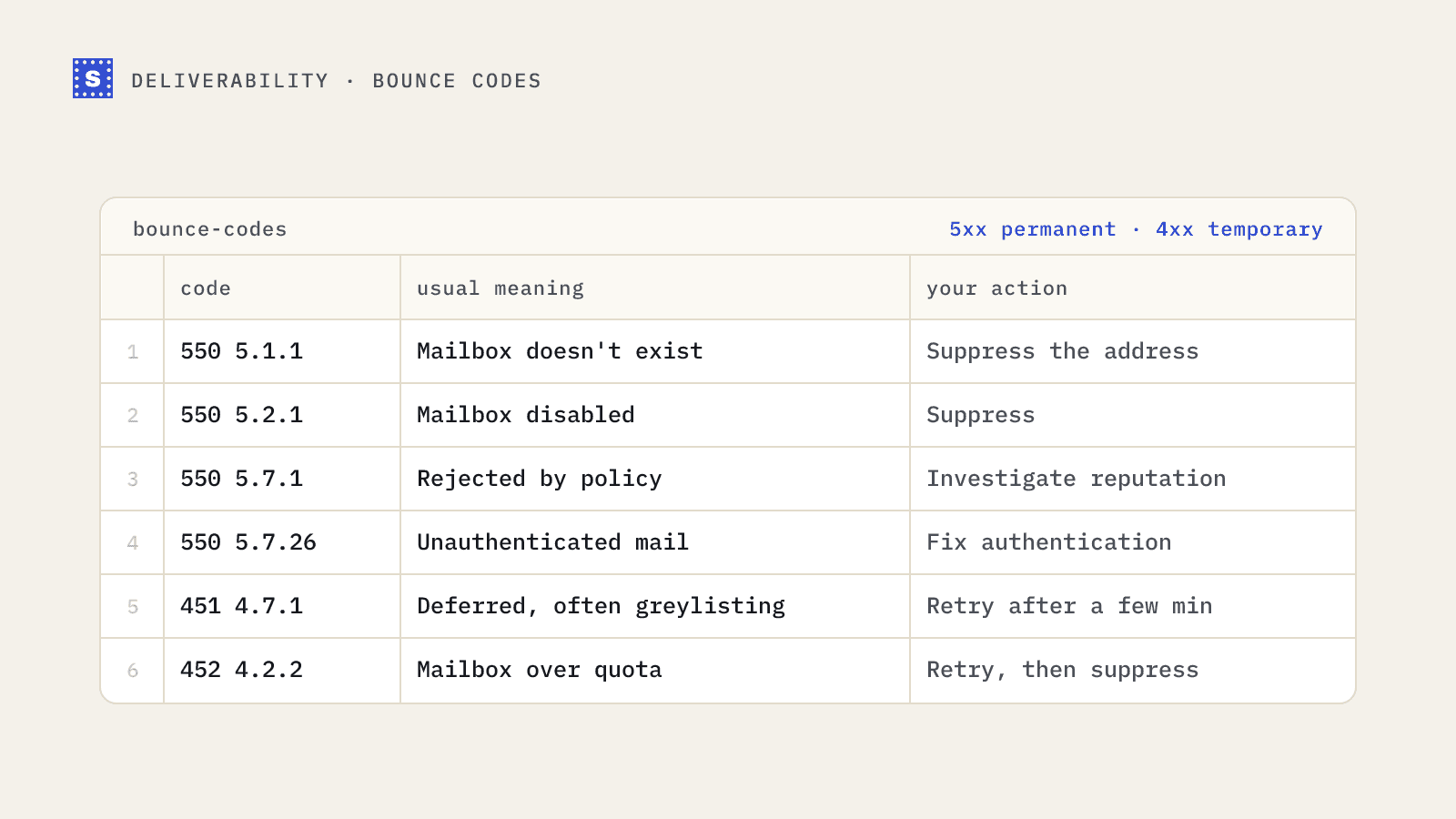
550 is the most common permanent rejection. On its own it only says "requested action not taken, mailbox unavailable", which covers a lot of ground. The enhanced code narrows it down:
| Code | Usual meaning | Your action |
|---|---|---|
| 550 5.1.1 | Mailbox doesn't exist | Suppress the address |
| 550 5.1.10 | Recipient not found (common wording from Microsoft-hosted domains) | Suppress |
| 550 5.2.1 | Mailbox disabled or not accepting mail | Suppress |
| 550 5.7.1 | Rejected by policy: blocked sender, content or reputation | Investigate your setup and reputation |
| 550 5.7.26 | Unauthenticated mail rejected (Gmail uses this for SPF/DKIM/DMARC failures) | Fix authentication |
| 550 5.4.1 | Recipient rejected at the edge, often "access denied" | Usually suppress; check if widespread |
The difference between the first group and the 5.7.x group matters. A 5.1.1 is about the recipient: no amount of fixing your setup will make that mailbox appear. A 5.7.x is about you: your IP, domain, authentication or content. Suppressing the contact hides the symptom while the cause keeps hurting every other send.
Other permanent codes you'll see
| Code | Meaning | Action |
|---|---|---|
| 553 5.1.3 | Bad address syntax | Fix or remove; this should have been caught at capture |
| 550 5.1.2 | Destination host unknown or unreachable | Check the domain; usually suppress |
| 552 5.2.2 | Mailbox full (sometimes sent as permanent) | Retry later a few times, then suppress |
| 552 5.3.4 | Message too big | Shrink the message; the contact is fine |
| 554 5.7.1 | Message rejected, often for spam or policy | Investigate content and reputation |
Temporary codes worth knowing
| Code | Meaning | Action |
|---|---|---|
| 421 4.7.0 | Try again later, often rate limiting or reputation | Slow down; retry with backoff |
| 450 4.2.1 | Recipient receiving mail too fast | Spread sends to that recipient out |
| 451 4.7.1 | Deferred, frequently greylisting | Retry after a few minutes |
| 452 4.2.2 | Mailbox over quota | Retry; suppress if it keeps happening |
| 452 4.5.3 | Too many recipients in one transaction | Split the batch |
Greylisting deserves a note. Some servers deliberately reject the first attempt from an unknown sender with a 4xx code, then accept a retry a few minutes later. Legitimate mail servers retry; many spam tools don't. If your platform handles retries properly, greylisting costs you a short delay and nothing else. More in the greylisting entry.
Which bounces verification can prevent
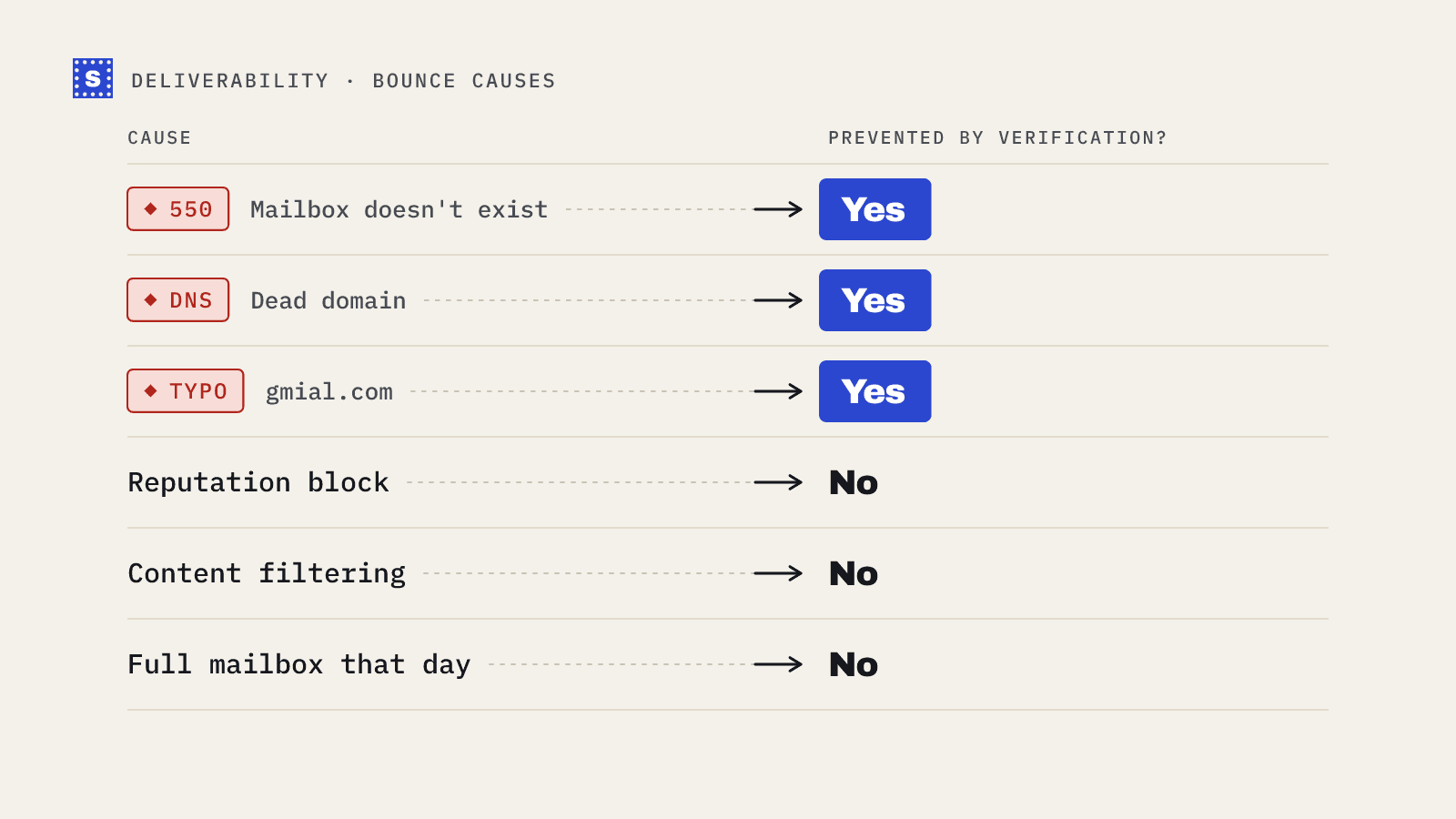
Verification before sending catches the recipient-side problems: addresses that don't exist (5.1.1, 5.1.10), disabled mailboxes, domains with no mail server and malformed addresses. Together those are the bulk of hard bounces on most lists.
It can't fix sender-side problems. If you're getting 5.7.26, your authentication is broken. If you're getting 5.7.1 or 554 across many domains, look at your sending reputation, your content and whether your IP or domain is on a blocklist. Verifying the list won't change those results.
| Bounce type | Prevented by verification? |
|---|---|
| Mailbox doesn't exist | Yes |
| Domain doesn't exist or has no MX | Yes |
| Syntax errors | Yes |
| Mailbox disabled | Often |
| Mailbox full | Sometimes; it's temporary by nature |
| Authentication failures | No; fix SPF, DKIM and DMARC |
| Policy and reputation blocks | No |
| Greylisting and rate limits | No; handled by retries |
Building bounce handling that doesn't need a human
If you send from your own system, parse the enhanced code and act on the class and subject:
5.1.xand5.2.1: suppress immediately.5.7.x: don't suppress automatically. Alert someone, because it's probably about you.4.x.x: retry with increasing delays. After several days of failures, treat as permanent.- Anything else in class 5: suppress, but log the full reply so you can review patterns.
Most ESPs already do something like this, though they differ in how many soft bounces they tolerate before suppressing. Read your provider's documentation rather than assuming.
Where to go from here
If most of your bounces are 5.1.1, the list is the problem. Run it through a bulk email verifier before the next send. SimpleCold also reports a failType of permanent or temporary for each result, so you can apply the same logic before anything is sent. If you're seeing 5.7.x codes, start with SPF, DKIM and DMARC and check whether you're listed with the blacklist checker. For the full taxonomy of codes, see SMTP status codes.