An email bounces when the receiving mail server refuses to take it, or takes it and later sends it back with a delivery failure notice. The message never reaches an inbox, and your sending platform logs a bounce against your account.
Some bounces are one-off noise. Others tell you something is wrong with your list, your domain setup or your reputation. The trick is reading the reason correctly, because the fix for "mailbox does not exist" has nothing in common with the fix for "message rejected by policy".
This post walks through the usual causes, how to recognise each one in a bounce message, and what to do about it. It also separates the causes that pre-send verification prevents from the ones it can't touch, because a verifier won't fix a broken DKIM record.
Hard bounces and soft bounces
Before the causes, one distinction matters more than any other.
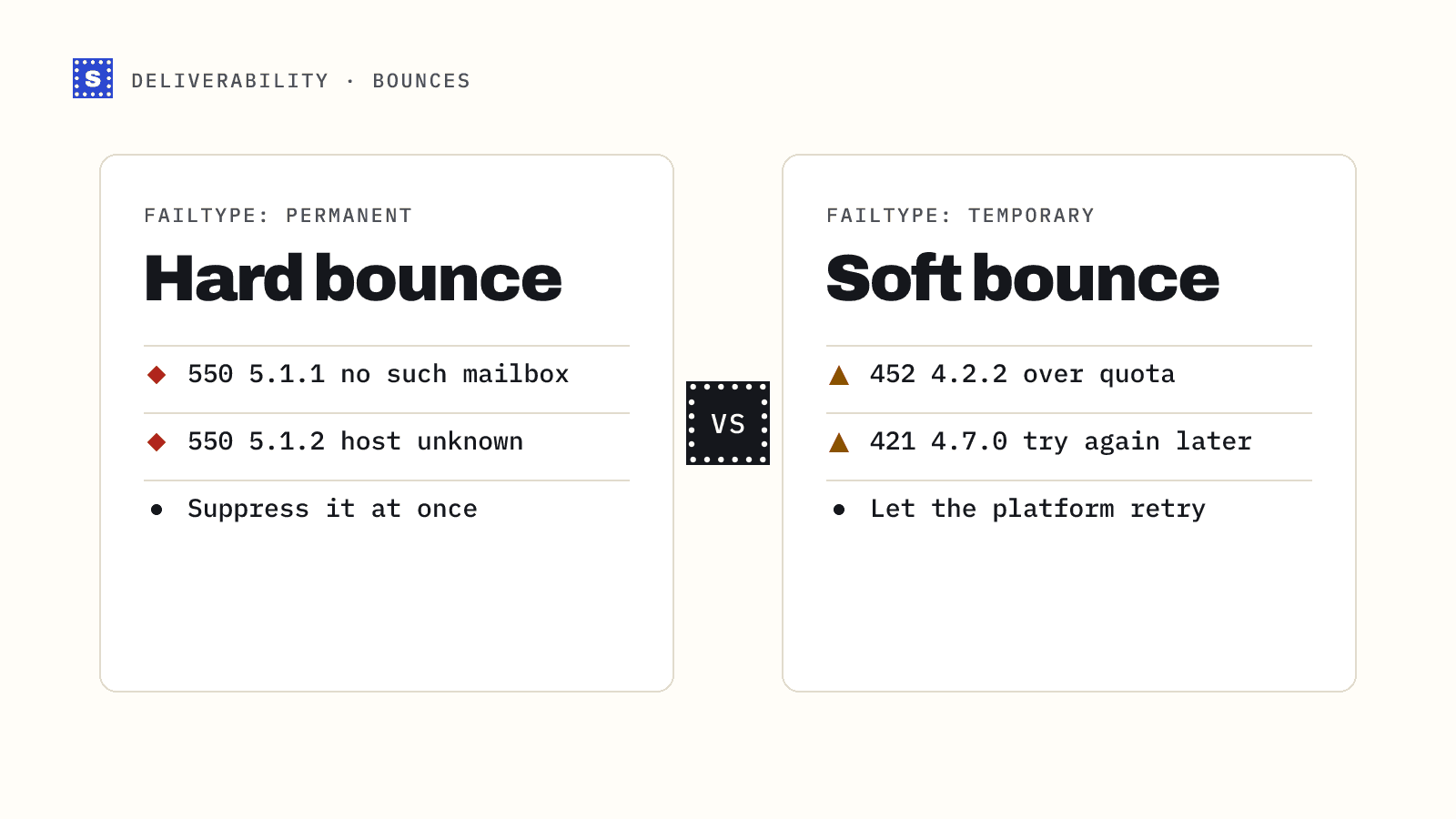
A hard bounce is permanent. The server is saying this will never work: the address doesn't exist, the domain doesn't exist, or the server has decided to refuse you outright. SMTP reply codes in the 5xx range signal a permanent failure.
A soft bounce is temporary. The mailbox is full, the server is busy, or you are being rate limited. These come back with 4xx codes, and your sending platform will usually retry for a while before giving up.
Hard bounces are the ones that damage sender reputation fastest, because mailbox providers read them as a sign that you didn't collect or maintain your list carefully. If you want the longer version, see hard bounce vs soft bounce.
Why do emails bounce? The common causes
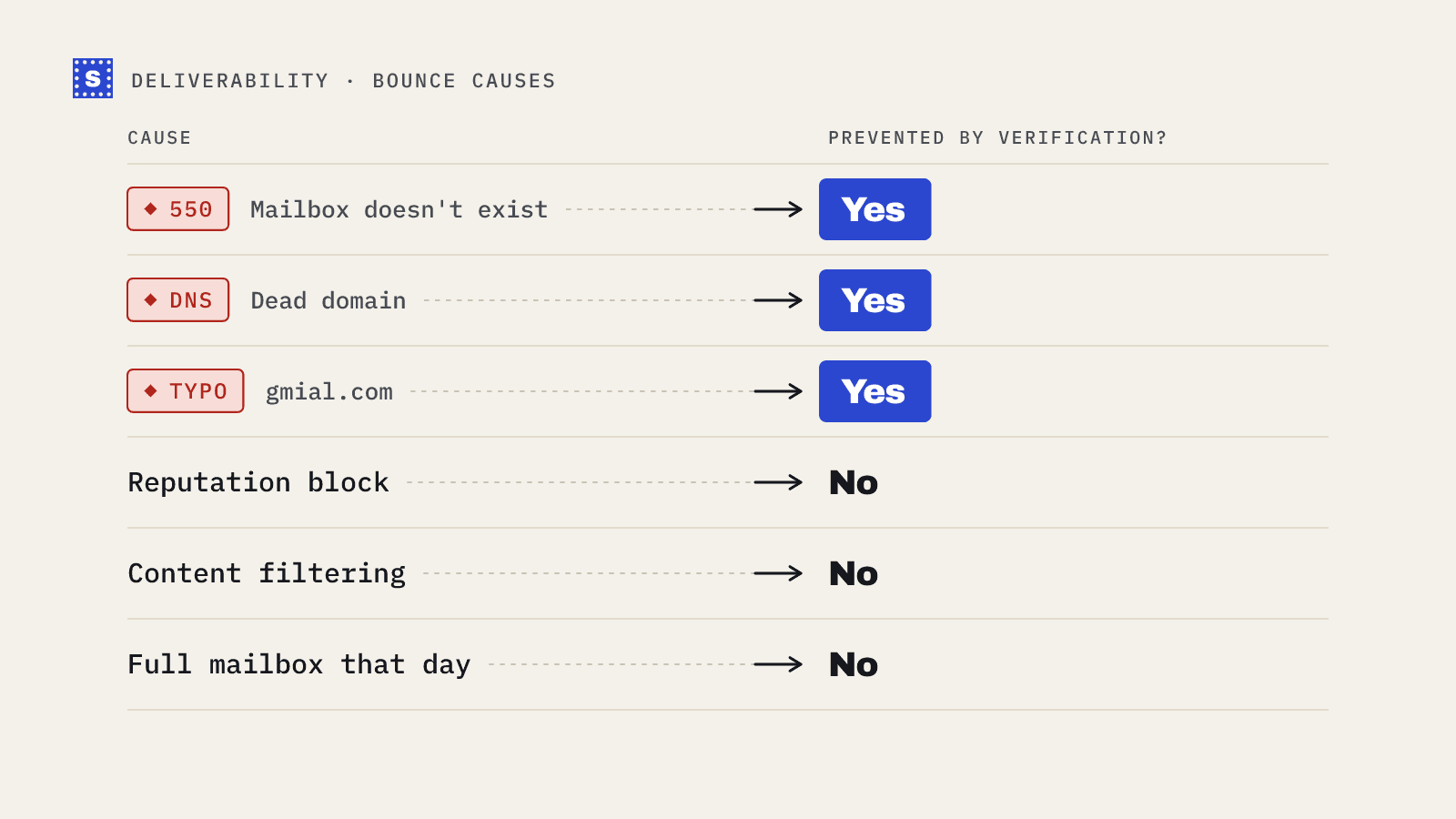
The table below covers the causes you will meet most often. The codes are typical examples; servers vary in exactly what they return.
| Cause | Typical code | Hard or soft | Would verification catch it? |
|---|---|---|---|
| Mailbox doesn't exist | 550 5.1.1 | Hard | Yes, in most cases |
| Domain doesn't exist or has no mail server | 550 5.1.2, or a DNS failure before SMTP | Hard | Yes |
| Typo in the domain (gmial.com) | Varies | Hard | Yes, usually with a suggestion |
| Mailbox disabled or suspended | 550 5.2.1 | Hard | Often |
| Mailbox full | 452 4.2.2 or 552 5.2.2 | Usually soft | No |
| Server busy or rate limiting you | 421 or 451 | Soft | No |
| Greylisting on first attempt | 450 or 451 | Soft | No |
| Message too large | 552 5.3.4 | Hard for that message | No |
| Authentication failure (SPF, DKIM, DMARC) | 550 5.7.x | Hard | No |
| Blocked for reputation or blocklisting | 550 5.7.1, 554 | Hard | No |
| Content flagged as spam | 550 5.7.1, 554 | Hard | No |
The address doesn't exist
This is the classic bounce. Someone left a company and IT deleted their mailbox. A form was filled with a made-up address. A lead database guessed a pattern (first.last@) that the company doesn't use.
The server responds to the recipient command with a "user unknown" style error. Nothing you change on your side will make that address work. Remove it and add it to your suppression list.
The domain is dead or misspelled
Companies get acquired, rebrand and let old domains lapse. When the domain no longer has DNS records, your server can't even find where to deliver, and the message fails before any SMTP conversation starts.
Typos fall in the same bucket. A sign-up form that accepts [email protected] produces an address that will never receive mail. Some typo domains are registered by third parties, which creates its own problems, so catching them at entry is better than cleaning them later. More on that in common email typos.
The mailbox is full or the server is busy
These are the soft bounces. A full mailbox usually means the account has been abandoned, so a mailbox that stays full across several sends is a strong hint that it is dead. Busy servers and rate limits usually clear on retry.
Watch the pattern. One soft bounce means little. Repeated soft bounces from the same address over weeks mean you should stop sending to it.
Greylisting
Some servers deliberately reject the first delivery attempt from an unfamiliar sender with a temporary error, then accept the retry. Legitimate mail servers retry; many spam tools don't. If your platform retries correctly, greylisting resolves itself. If you see these in bulk and they never clear, look at your sending setup.
Authentication failures
Since February 2024, Google and Yahoo require bulk senders to authenticate with SPF, DKIM and DMARC, with the From domain aligned. Microsoft announced similar requirements for high-volume senders to Outlook.com, effective May 2025. Mail that fails these checks can be rejected or junked, and rejections usually come back with 5.7.x codes that mention authentication or policy.
If a large share of your bounces cite SPF, DKIM or DMARC, the problem is your DNS setup, and every address on your list is affected equally. Start with SPF, DKIM and DMARC explained, then check your records with the SPF checker, DKIM checker and DMARC checker.
Reputation blocks and spam filtering
When a mailbox provider doesn't trust your domain or IP, it may refuse the message with a policy error. Causes include a history of high bounce rates, spam complaints, hitting spam traps, or a sending IP that appears on a blocklist. The blacklist checker will tell you if your domain or IP is listed.
Content can also trigger a rejection, though most content problems land in the spam folder rather than bouncing.
How to read a bounce message
Bounce notices look messy, but the useful part is short. Find the SMTP reply line. It usually looks like this:
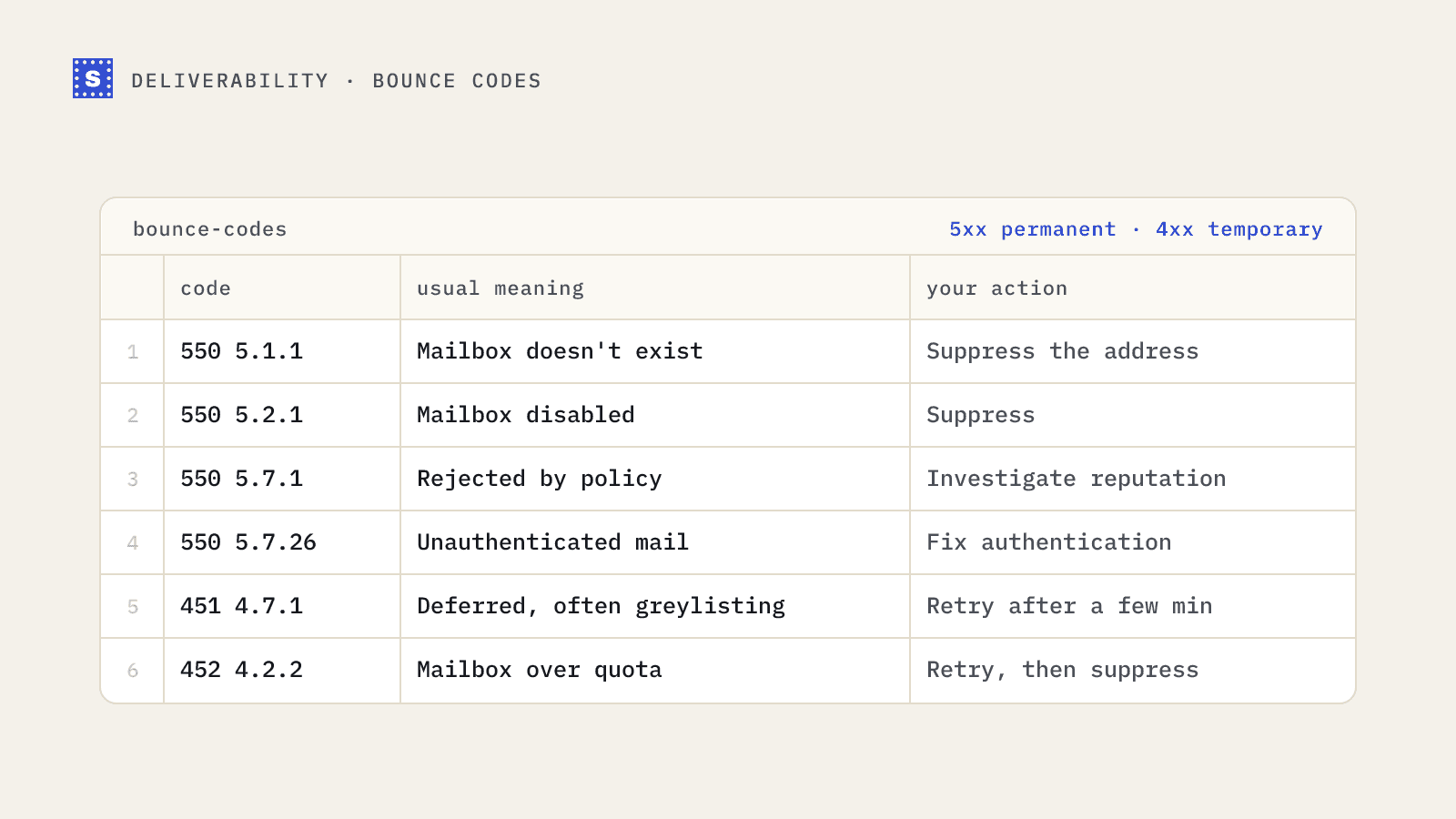
550 5.1.1 <[email protected]>: Recipient address rejected: User unknown
Three pieces matter:
- The basic code (550). The first digit tells you the class: 2 is success, 4 is temporary failure, 5 is permanent failure.
- The enhanced status code (5.1.1), defined in RFC 3463. The middle digit gives the category: 1 is addressing, 2 is mailbox, 3 is mail system, 4 is network, 5 is protocol, 6 is content, 7 is security or policy.
- The text, which is free-form and varies by provider but often names the real reason.
So 5.1.1 reads as "permanent, addressing problem, bad destination mailbox". 5.7.1 reads as "permanent, security or policy, delivery not authorised". The SMTP bounce codes post has a longer reference table.
Which bounces verification prevents
Email verification checks an address before you send to it. A good verifier confirms the syntax, looks up the domain's MX records, checks whether the domain is disposable or role-based, and asks the mail server whether the mailbox exists without sending a message.
That covers the address-level causes: nonexistent mailboxes, dead domains, typos and many disabled accounts. Those are exactly the hard bounces that hurt reputation, which is why cleaning a list before a send is the cheapest fix available.
It does not cover:
- Authentication problems on your own domain
- Reputation blocks and blocklistings
- Content filtering
- Full mailboxes and temporary server issues on the day of sending
- Addresses on catch-all domains, which accept everything at the SMTP stage and may bounce later
A practical fix list
Work through this in order the next time your bounce rate jumps.
- Group the bounces by enhanced code. Export the bounce log and count 5.1.x versus 5.7.x versus 4.x.x. The mix tells you where to look.
- If 5.1.x dominates, it's the list. Suppress every hard-bounced address, then verify the rest of the list before the next send.
- If 5.7.x dominates, it's you. Check SPF, DKIM and DMARC alignment, then check blocklists, then look at recent volume spikes.
- If 4.x.x dominates, slow down. Lower your sending rate per domain and let retries work. Investigate any address that soft-bounces repeatedly.
- Fix the source. If bad addresses keep arriving through a form, add real-time checks at sign-up. If they arrive through purchased or scraped data, verify every import before it reaches your sending tool.
Where SimpleCold fits
SimpleCold handles the list side. You can check one address in the free email checker, upload a CSV to the bulk email verifier, or call the API from a form. Every result comes back as Deliverable, Risky or Undeliverable with a plain reason, such as "This mailbox does not exist" or "The domain accepts mail for any address, so this mailbox can't be confirmed", so you know which bounce you avoided and why.
Start with your last bounce log. Sort it by code, and you'll know within ten minutes whether your next step is cleaning the list or fixing your DNS.