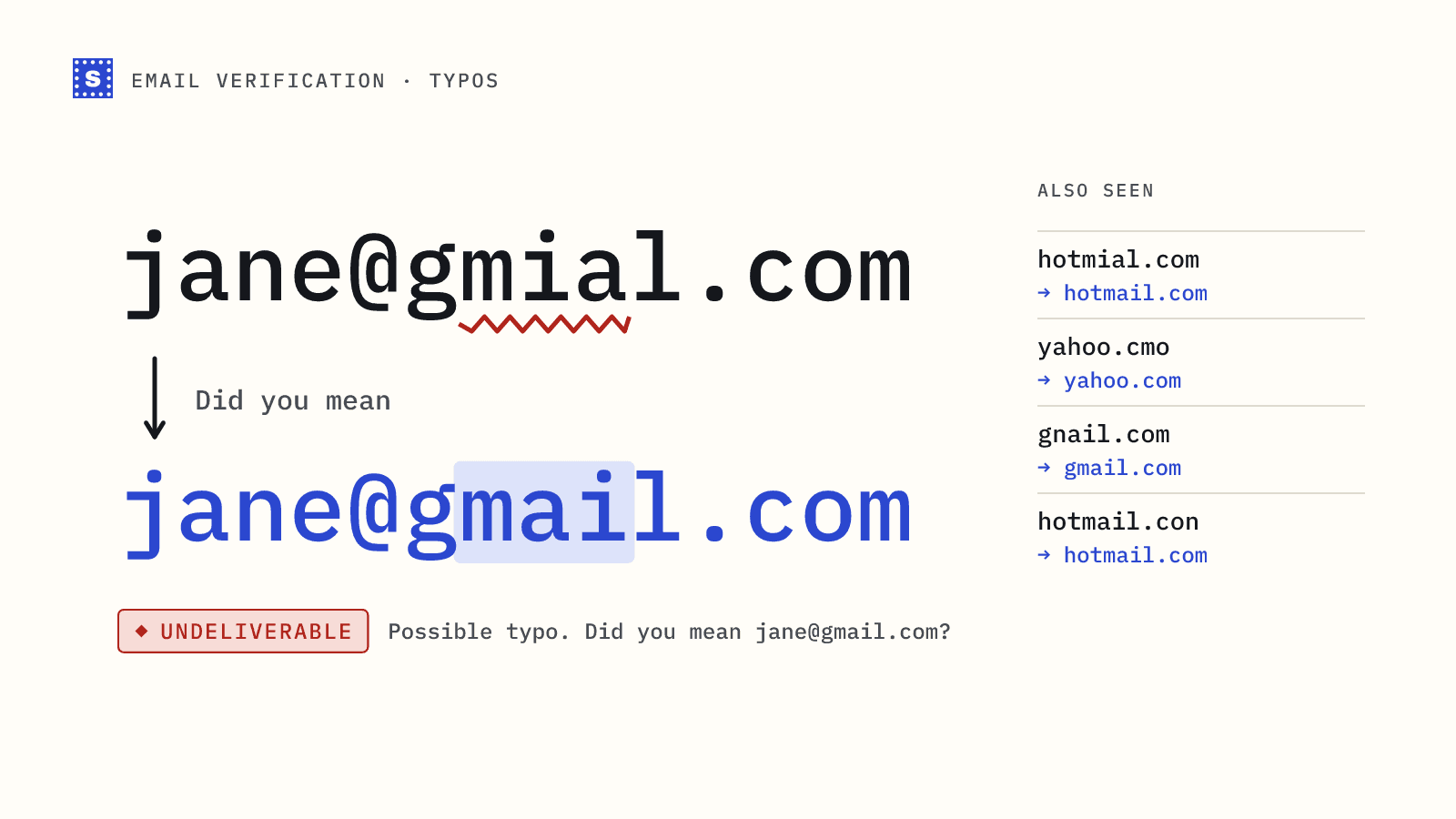
A surprising number of bad addresses on any list aren't fake. They belong to real people who typed their own email wrong. [email protected] was meant to be [email protected], and the person who entered it is now waiting for a receipt, a password reset or a welcome email that will never arrive.
Common email typos follow predictable patterns, which makes them one of the easier data quality problems to fix. This post covers the patterns, why they matter more than they look, and how to catch them before they reach your database.
The common email typos, by pattern
Most typos fall into a handful of shapes. Here they are with examples on the big webmail domains, where the majority of consumer signups land.
| Pattern | Examples | Intended |
|---|---|---|
| Swapped letters | gmial.com, hotmial.com, yahoo.cmo | gmail.com, hotmail.com, yahoo.com |
| Missing letter | gmai.com, yaho.com, outlok.com | gmail.com, yahoo.com, outlook.com |
| Extra letter | gmaill.com, hotmaill.com | gmail.com, hotmail.com |
| Neighbouring key | gnail.com, hotmsil.com | gmail.com, hotmail.com |
| Wrong TLD | gmail.co, gmail.cm, hotmail.con | gmail.com, hotmail.com |
| Missing dot | gmailcom, yahoocom | gmail.com, yahoo.com |
Doubled @ or stray characters | jane@@gmail.com, [email protected]. | [email protected] |
| Autocomplete gone wrong | [email protected]@gmail.com | [email protected] |
Business domains get typos too, but they're harder to fix automatically because there's no short list of "correct" domains to compare against. A suggestion for acmee.com might be right, or Acmee might be a real company.
Why typos cost more than one lost contact
The obvious cost is the person you can't reach. For an e-commerce checkout, that's an order confirmation and shipping updates. For a SaaS signup, it's an account the user can't verify and will probably abandon.
The less obvious costs:
- Bounces. If the typo domain doesn't exist or has no mail server, every message hard bounces. That counts against your bounce rate.
- Typo traps. Some misspelled domains are registered and monitored as spam traps. Mail sent to them is a signal that you don't confirm addresses. Our spam trap explainer covers this.
- Duplicates. The person often signs up again with the right address, and now you have two records for one customer.
- Support load. "I never got the email" tickets are frequently typos.
How to catch typos at signup
The best moment to fix a typo is while the person is still on the page. Three layers work well together.
1. Basic format checks
A sensible regex catches doubled @ signs, spaces and missing dots. It won't catch gmial.com, which is perfectly well formed. See email validation regex for a pattern that doesn't reject legitimate addresses.
2. A "did you mean" suggestion
Compare the domain against a list of popular domains and suggest the closest match when it's within one or two edits. Show it as a question, not a correction:
Did you mean [email protected]?
Let the user click to accept. Never silently rewrite the address; occasionally the unusual domain is real.
A small client-side version using edit distance:
const KNOWN = ["gmail.com", "yahoo.com", "hotmail.com", "outlook.com", "icloud.com", "aol.com"];

function distance(a, b) {
  const dp = Array.from({ length: a.length + 1 }, (_, i) => [i]);
  for (let j = 1; j <= b.length; j++) dp[0][j] = j;
  for (let i = 1; i <= a.length; i++) {
    for (let j = 1; j <= b.length; j++) {
      const cost = a[i - 1] === b[j - 1] ? 0 : 1;
      dp[i][j] = Math.min(dp[i - 1][j] + 1, dp[i][j - 1] + 1, dp[i - 1][j - 1] + cost);
    }
  }
  return dp[a.length][b.length];
}

export function suggestDomain(email) {
  const [local, domain] = email.trim().toLowerCase().split("@");
  if (!local || !domain || KNOWN.includes(domain)) return null;
  const best = KNOWN.map((d) => [d, distance(domain, d)]).sort((x, y) => x[1] - y[1])[0];
  return best[1] > 0 && best[1] <= 2 ? `${local}@${best[0]}` : null;
}
This handles the webmail cases. It knows nothing about business domains, and it can't tell you whether the corrected address actually exists.
3. Server-side verification
A client-side check runs in the user's browser, so anyone can skip it, and it only knows the domains you hard-coded. A server-side verification call covers both gaps. It flags known misspellings with a suggestion, and for every other address it goes on to check DNS and the mail server, so a mistyped business domain that doesn't exist still gets caught.
With the SimpleCold email verification API, a response for a misspelled webmail domain looks like this:
{
  "email": "[email protected]",
  "category": "undeliverable",
  "status": "possible_typo",
  "statusMessage": "Possible typo. Did you mean [email protected]?",
  "suggestion": "[email protected]"
}
(The real response has a few more fields; this is trimmed.) A recognised typo stops the check early, before any DNS lookup or mail server connection, and comes back Undeliverable with the possible_typo status. Your form shows the suggestion, the user clicks it, and the corrected address gets verified on the next call. Our guide to verifying emails at signup with Node.js wires this up end to end.
What SimpleCold's typo check covers
The suggestion comes from two lists rather than a fuzzy match against every domain on the internet, which keeps false corrections rare.
The first is a list of known misspellings of the big consumer providers: Gmail, Hotmail, Outlook, Yahoo, iCloud and AOL. It includes the usual suspects from the table above, such as gmial.com, gamil.com, gnail.com, hotmial.com, outlok.com, yaho.com and iclod.com, along with shortened endings like gmail.co.
The second is a short list of top-level domain slips that apply to any domain: .con, .cmo, .ocm, .comm, .vom, .xom and .cpm all get a .com suggestion. So [email protected] comes back with [email protected] suggested, even though acme is not on any list.
Anything outside those two lists, such as acmee.com, gets no suggestion. It is checked like any other address: if the domain doesn't exist you get no_mail_server, and if it exists you get whatever the mail server says. That's the honest limit of automatic correction. For business domains, the person who typed the address, or your sales team, has to make the call.
Fixing typos already on your list
For addresses you've already collected, you can't ask the person. You can still clean up:
- Run the list through a bulk email verifier. SimpleCold adds the fix to the
Suggestioncolumn of the CSV whenever it spots a likely misspelled domain, next to theResultandReasoncolumns. - Review suggestions before applying them. For webmail domains the correction is usually obvious. For business domains, check the company's website.
- Re-verify the corrected addresses. A suggestion isn't confirmation. Run the fixed rows again.
- Reach the person another way if you can. If you have a phone number or account login, ask them to confirm their email.
- Suppress the rest. Undeliverable typo addresses you can't fix should go on your suppression list so they don't come back with the next import.
A quick checklist for forms
- Trim whitespace and lowercase the domain before validating.
- Validate on blur, not on every keystroke.
- Offer a "did you mean" suggestion and let the user choose.
- Verify server-side before creating the account or sending the first email.
- Send a confirmation email for anything where the address really matters.
You can test how a single address is handled, typo suggestion included, with the free email checker. The typo detection page has more on how suggestions work in the product.