Catch-all addresses are the part of every verification report that people want to make disappear. You uploaded a list to find out which addresses work, and for a slice of it the answer is "can't tell". So the natural next question is how to verify catch-all emails properly.
The honest answer is that you can't confirm a specific mailbox on a catch-all domain the way you can on a normal one. What you can do is gather other evidence, reduce the risk, and make a decision with your eyes open. This post covers what's possible, what vendors mean when they say they "resolve" catch-all, and a workflow that holds up.
Why the normal check fails
Email verification confirms a mailbox by asking the domain's mail server about it during an SMTP conversation. The server accepts or rejects the recipient, and that's the signal.
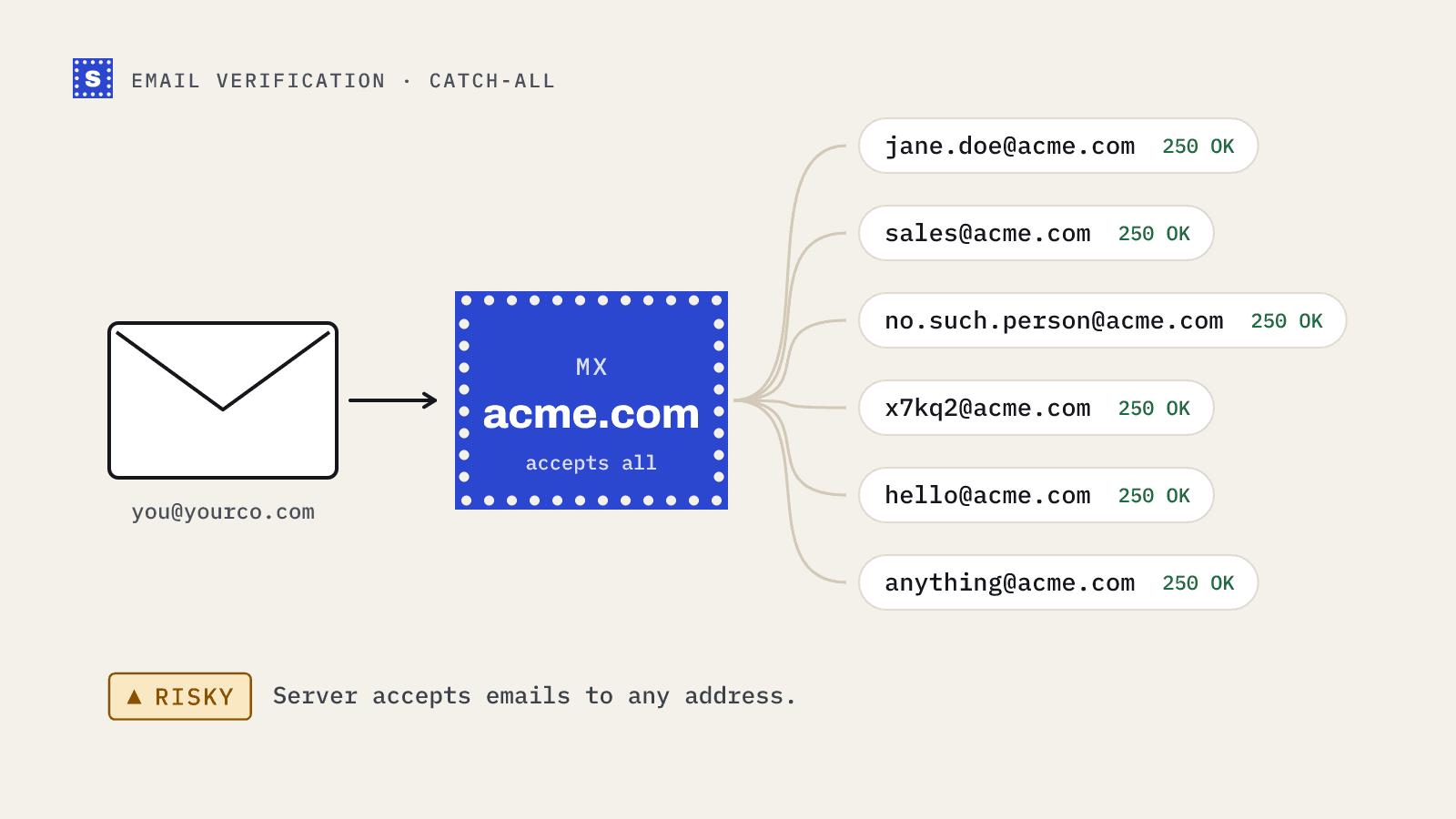
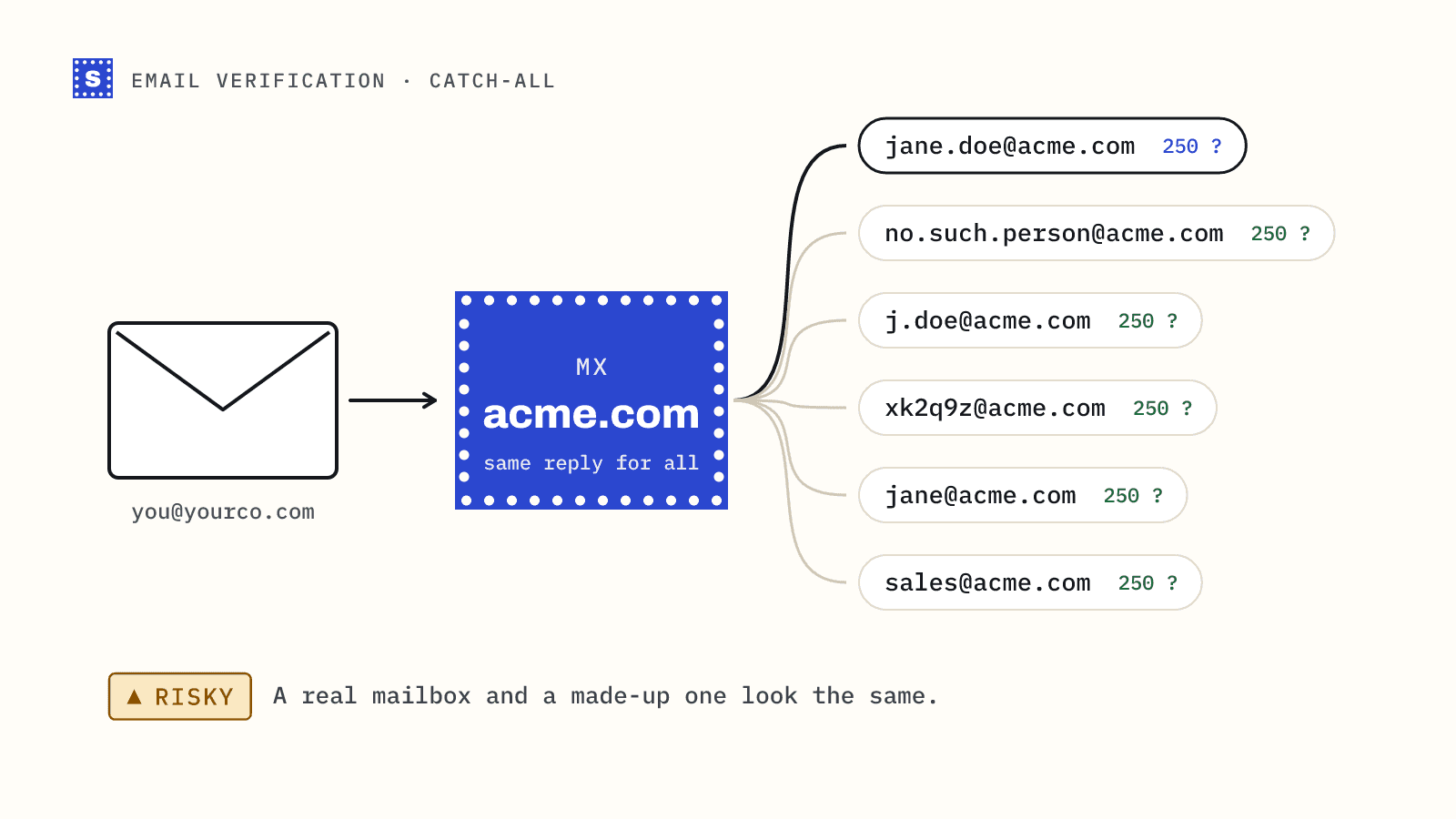
A catch-all server accepts every recipient. Real address, fake address, random string: all get the same 250 OK. Verifiers detect this by asking about an address that can't exist. When that's accepted, the domain is marked catch-all and the mailbox signal is gone for every address on it.
Some of those addresses are real and will receive your mail. Others don't exist and will bounce after the server accepts the message, or disappear silently. The server never told anyone which is which. For a full explanation, read what a catch-all domain means for your list.
Techniques for verifying catch-all emails
Several approaches exist. All of them produce a likelihood, not a confirmation.
Pattern matching
If you know a company uses first.last@, an address in that format is more likely to be real than flast@. Some tools learn company patterns from addresses they've confirmed elsewhere. This helps rank guesses but can't tell you whether this particular person still works there.
Engagement and history signals
If an address has opened, clicked or replied to mail in the past, someone was reading it. Some vendors pool signals like this across customers. It's real evidence, but it's historical, and it depends on the vendor having seen that exact address before.
Send-and-watch
Send a real email and watch for a bounce. This is the only method that tests delivery directly, which is why people use it, carefully, in small batches. The cost is that every failed test is a real bounce on your sending record.
Gateway and host behaviour
Some domains look catch-all from outside because a security gateway accepts everything at the edge. Knowing which gateway or mail host is involved helps estimate how a domain behaves, and some hosts give clearer answers in other ways. This is detailed, provider-specific work and changes over time.
External confirmation
A person's address listed on the company website, in an email signature, in a press release or in a reply they sent you is about as good as evidence gets. It doesn't scale, but for high-value contacts it's worth the few minutes.
What "catch-all resolved" claims usually mean
Some vendors advertise that they can verify or resolve catch-all addresses, sometimes with impressive percentages. Before relying on that, ask:
- Is the result a confirmation or a score? Most "resolved" results are probabilistic labels built from the techniques above.
- How was accuracy measured? On what kind of list, and against what ground truth? Bounce data from real sends is the only meaningful test.
- What happens when they're wrong? If a "resolved valid" address bounces, do you get anything back?
- Is catch-all folded into valid? Some reports blend accept-all into the good bucket. The bounces show up later.
None of this means those signals are useless. It means a score should be treated as a score, and you should test it on your own sends before trusting it with your main domain.
A practical workflow for catch-all addresses
1. Split them out
After verification, move every catch-all address into its own segment. Don't let them mix with confirmed deliverable addresses.
2. Rank by evidence
Score each address on what you know:
| Evidence | Weight |
|---|---|
| Person gave you the address or replied before | Strong |
| Address found publicly (website, signature) | Strong |
| Matches a confirmed company pattern | Medium |
| From a lead database, recently checked | Medium |
| Guessed pattern, no other evidence | Weak |
3. Decide by value
High-value contacts with strong evidence: send. Low-value contacts with weak evidence: skip. Everything in between depends on your bounce budget. The risk framework post covers this in detail.
4. Send-and-watch in small batches
For the middle group, send a small batch first from a mailbox that isn't your strongest. Wait a day for late bounces. If a domain produces bounces, suppress the rest of that domain. If the batch is clean, continue in similar-sized batches.
5. Promote on engagement
Anyone who replies or clicks is confirmed. Move them to your regular segment.
6. Record what happened
Keep the bounce outcome for each catch-all domain. Next time the domain shows up, you'll know how it behaved.
Mistakes that cost domains
- Sending an entire catch-all segment at full volume from a new domain.
- Treating a vendor's "probably valid" label as equal to a confirmed mailbox.
- Re-running verification on the same catch-all addresses and expecting a different answer.
- Guessing addresses on catch-all domains in bulk. Verification can't filter the wrong guesses.
How SimpleCold handles catch-all
SimpleCold probes each domain once with an address that can't exist and caches the result for that domain. Addresses on catch-all domains come back Risky with the status accept_all and the reason "The domain accepts mail for any address, so this mailbox can't be confirmed." We don't relabel them as deliverable, because that would be a guess, and guesses become bounces. You get the domain, the mail server location and the reason in every row, so splitting and ranking is a filter in a spreadsheet.
You can check whether a domain is catch-all with the free catch-all checker, or upload a list to the bulk email verifier. The catch-all detection page has more on how the probe works.
Take your last verified list, filter to the catch-all rows, and sort them by source. The ranking step above will take less time than you expect.