Sender reputation is the running opinion mailbox providers hold about you. It decides whether your email lands in the inbox, the spam folder or nowhere at all. Nobody hands you a single score, and every provider calculates its own version privately. You can still see enough of it to act, and the levers that move it are well understood.
What sender reputation is made of
Reputation attaches to a few identifiers at once:
- Domain reputation: tied to the domain in your From address and the domains you sign with DKIM. This matters more than it used to, because it follows you across IPs and email platforms.
- IP reputation: tied to the servers that send your mail. If you're on a shared IP at an ESP, you share part of it with other customers. Dedicated IPs carry only your history.
- Other signals: links and domains inside your messages, the return-path domain and, at some providers, the individual sending mailbox.
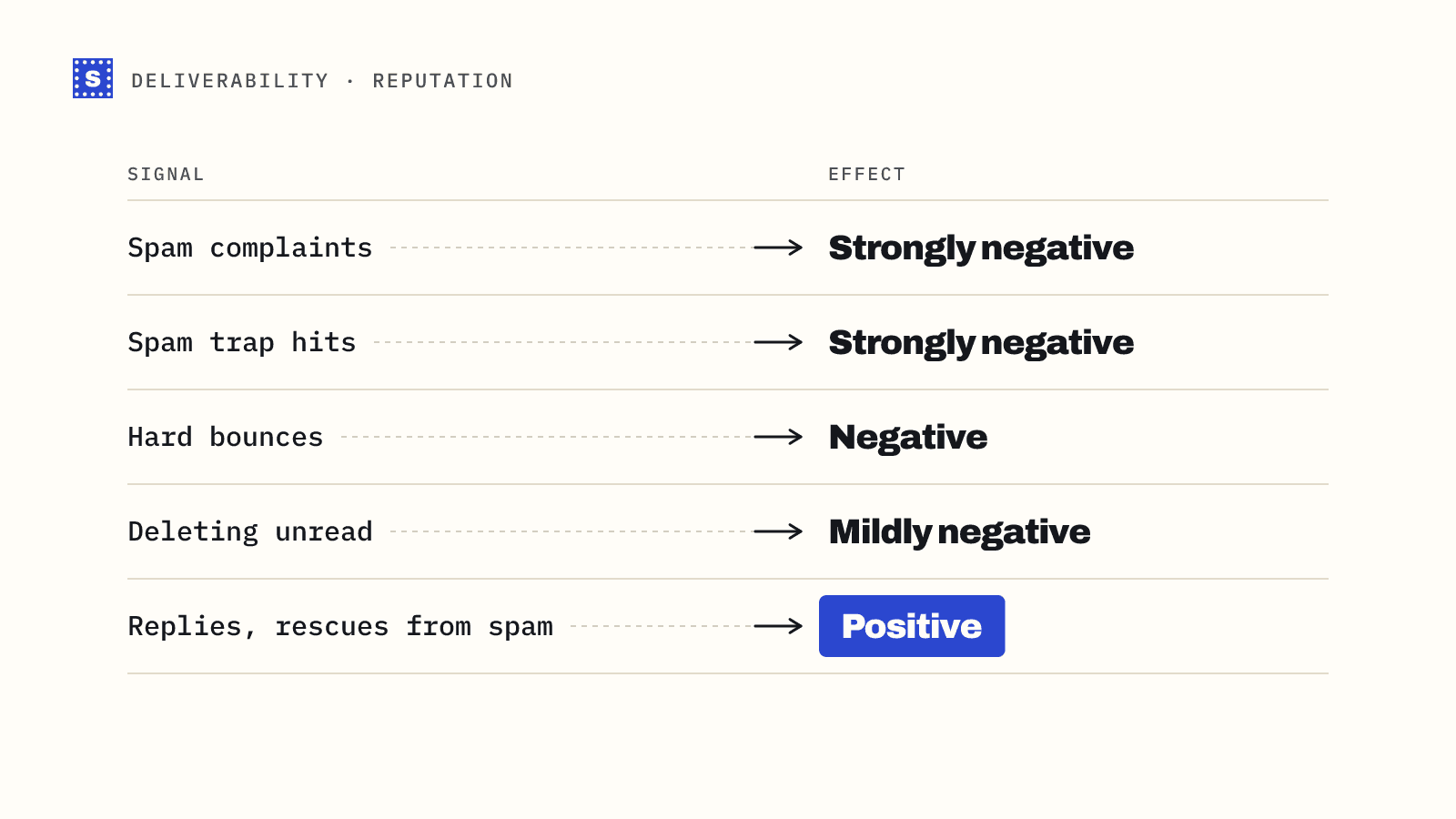
Providers build those reputations from what happens to your mail:
| Signal | Effect |
|---|---|
| Spam complaints | Strongly negative. Google and Yahoo require bulk senders to stay below a 0.3% spam rate |
| Hard bounces | Negative. Hitting nonexistent addresses suggests a poor list |
| Spam trap hits | Strongly negative. See spam trap |
| Opens, replies, moving mail out of spam | Positive |
| Deleting without reading | Mildly negative at some providers |
| Authentication passing (SPF, DKIM, DMARC) | Required baseline rather than a boost |
| Sudden volume spikes | Negative, especially from a new domain or IP |
How to check your sender reputation
There's no universal lookup, but these free sources cover most of what you need.
Google Postmaster Tools
If you send meaningful volume to Gmail, set this up first. You verify your domain with a DNS record and Google shows you spam rate, authentication results, encryption and delivery errors for mail sent to Gmail users. It only shows data once you send enough daily volume to Gmail, so small senders may see empty charts.
The spam rate chart is the one to watch, since it's the number Google's bulk sender rules refer to.
Microsoft SNDS
Smart Network Data Services shows data for IPs you control sending to Outlook.com and Hotmail: volume, complaint rates and trap hits. It's IP-based, so it's most useful if you have dedicated sending IPs.
Blocklist checks
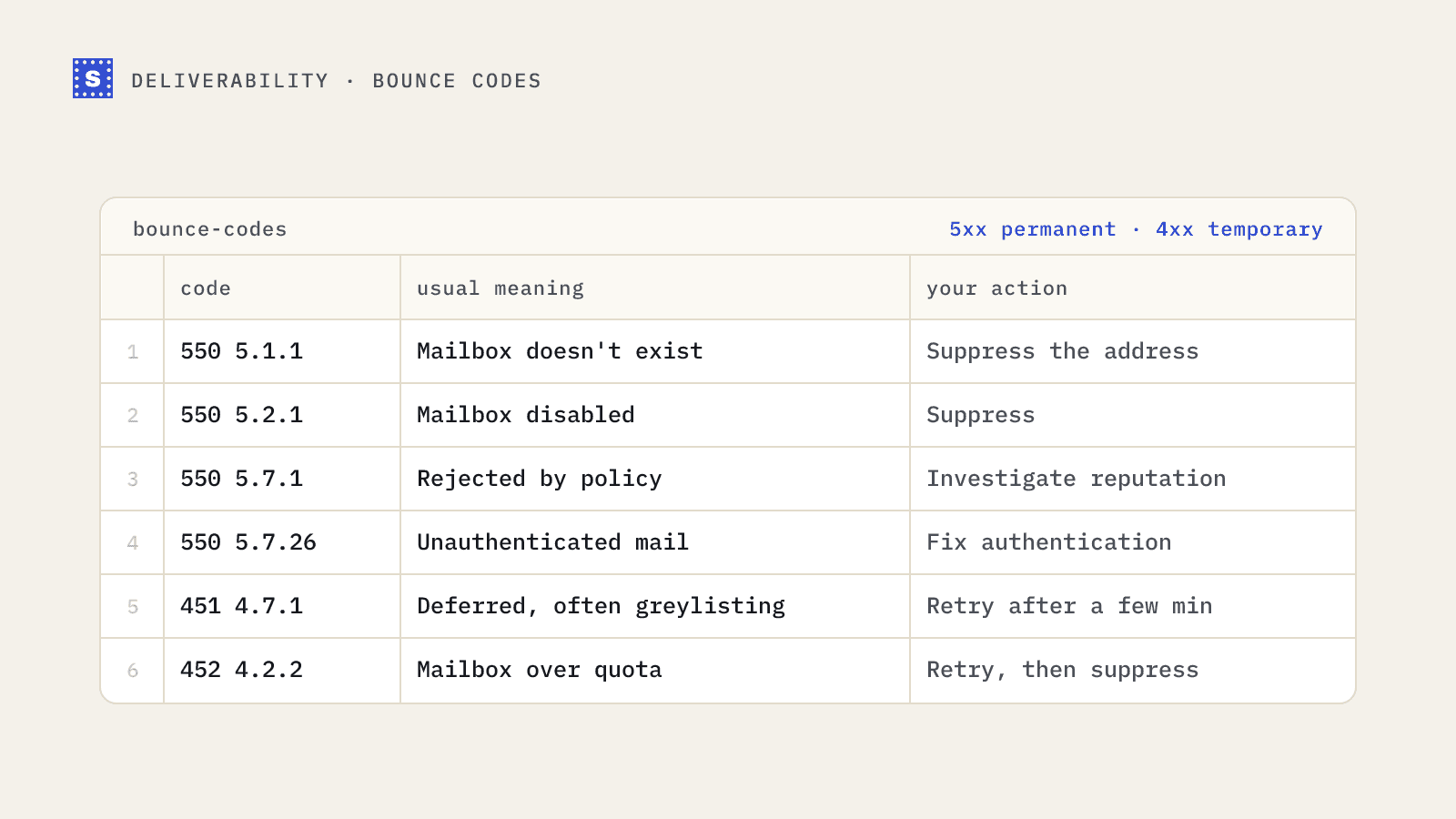
Public blocklists (DNSBLs) record IPs and domains seen sending spam. A listing on a major one can cause rejections across many receivers. Check periodically with the blacklist checker, and immediately whenever you see a jump in 5.7.x bounces.
Your own data
The most reliable reputation signal is already in your sending reports:
- Inbox placement tests with seed accounts across providers
- Open and reply rates by mailbox provider (a sudden drop at one provider points to a reputation issue there)
- Bounce codes, especially policy rejections
- Complaint counts from feedback loops
Why reputation drops
The usual causes, roughly in order of how often they're behind a sudden decline:
- A bad list. An import with dead addresses or old contacts produces bounces and trap hits in one send.
- Mailing people who don't want it. Unclear sign-up, no easy unsubscribe or too-frequent sends lead to complaints.
- Volume spikes. Going from 200 emails a day to 20,000 overnight looks like a compromised account.
- Broken authentication. A DNS change that breaks SPF or a missing DKIM key.
- Content and links. Links to domains with poor reputations, URL shorteners and heavy image-only messages.
How to fix a damaged reputation
Reputation recovers by sending mail that gets good reactions for long enough. There's no shortcut, but there is a sensible order.
1. Stop the bleeding
Pause bulk sends to your least engaged contacts. Keep sending only to people who have opened or replied recently. A smaller, engaged audience rebuilds trust faster than a large indifferent one.
2. Clean the list
Verify the full list and remove undeliverable addresses before your next campaign. Separate catch-all and no-response addresses and hold them back until reputation recovers. If you've been hitting traps, this is where most of them come from: old addresses that were abandoned and later recycled.
3. Check authentication
Make sure SPF, DKIM and DMARC all pass and align with your From domain. The SPF, DKIM and DMARC checkers show what's published. Google and Yahoo's 2024 rules made this mandatory for bulk senders.
4. Make unsubscribing easy
Add one-click unsubscribe headers (RFC 8058) on marketing mail and honour requests quickly. Bulk sender rules require processing within two days. Someone who can't unsubscribe will press "report spam" instead.
5. Ramp back up slowly
Increase volume in steps over a few weeks, adding less engaged segments only when the metrics hold. This is the same logic as warming up a new domain.
Reputation for cold email domains
Cold outreach is harder on reputation because recipients didn't sign up. That's why outbound teams use separate sending domains, limit each mailbox to modest daily volumes, and verify every list. Keeping hard bounces low is one of the few reputation signals entirely under your control before you send. The cold email deliverability checklist covers the rest.
SimpleCold handles the list side of this. Running a list through the bulk email verifier before each campaign keeps bounces and recycled-trap exposure down, which is one less thing dragging your reputation while you work on the others.