Email verification is the process of checking whether an email address can actually receive mail before you send anything to it. A verifier takes an address like [email protected], runs it through a series of checks, and tells you whether a message would land in a real mailbox, bounce, or fall somewhere in between.
That sounds simple, and the first few checks are. The later ones involve talking to the recipient's mail server, and that is where most of the interesting edge cases live. This post walks through each step in the order a verifier normally runs them, then explains how to act on the results.
Why email verification exists
Every address on a list was correct at some point, or at least someone typed it in believing it was. Since then people have changed jobs, companies have been acquired and rebranded, domains have expired, and signup forms have collected typos like gmial.com. When you send to those addresses, the receiving server rejects the message and you get a bounce.
A few bounces are normal. A steady stream of them tells mailbox providers that you don't maintain your list, and they start treating your mail with more suspicion. Verification lets you find the dead addresses before the providers do.
How email verification works, step by step
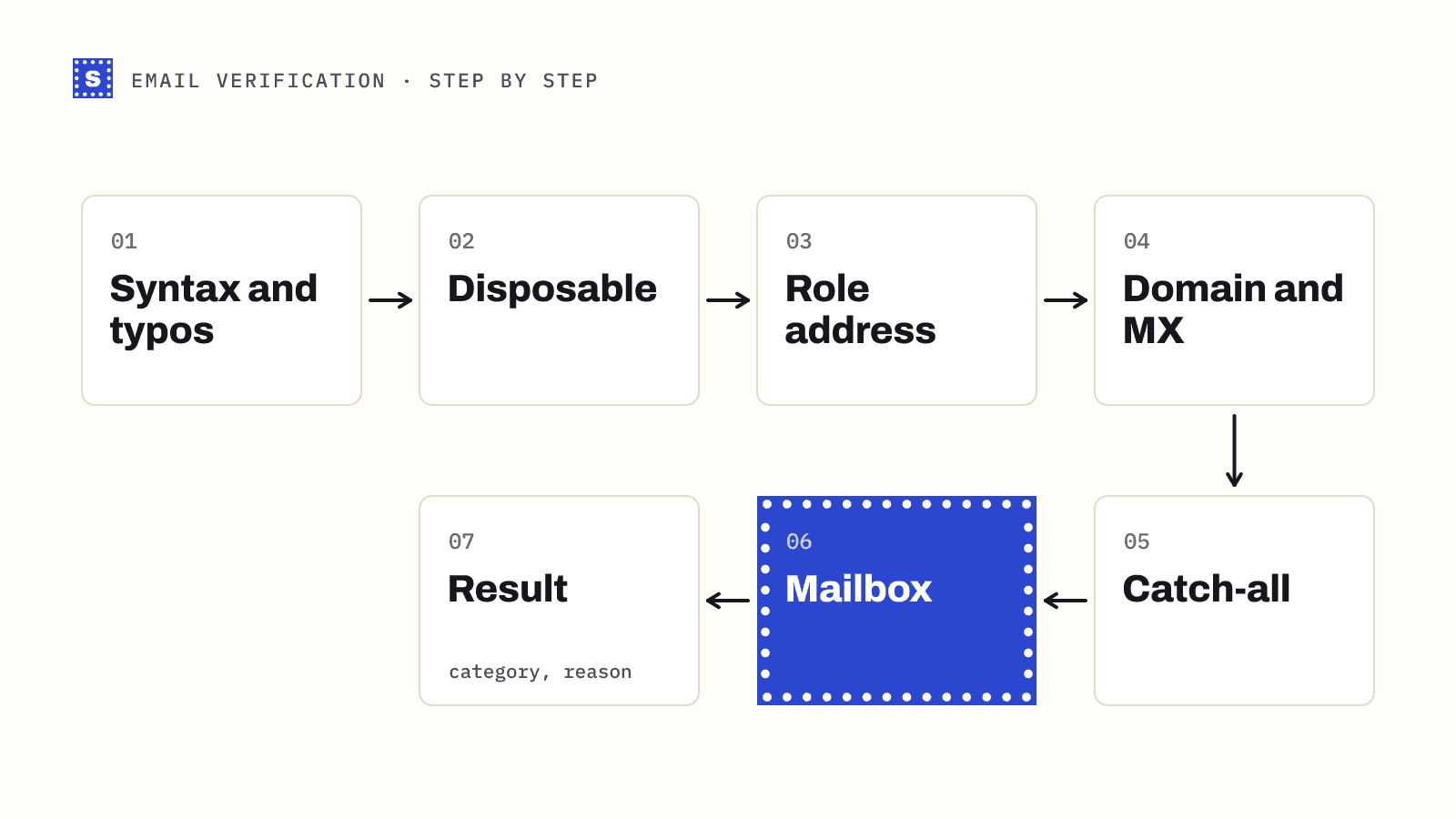
Most verifiers run the cheap checks first and stop as soon as one of them gives a definite answer. That keeps the expensive part, the conversation with the mail server, for addresses that pass everything else.
1. Normalize the address
The verifier trims spaces, lowercases the domain, and strips invisible characters that sneak in from spreadsheets and copy-paste. Two rows that differ only by a trailing space are the same address and should be checked once.
2. Check the syntax
The address has to follow the format rules: one @, a local part before it, a domain after it, no illegal characters, and sensible lengths. The local part can be at most 64 characters and the whole address is practically capped at 254. Anything that fails here is undeliverable, and no network call is needed to know it.
3. Look for disposable and role-based addresses
Disposable addresses come from services that hand out temporary inboxes which expire after minutes or days. Role-based addresses such as info@, sales@ or support@ belong to a function, not a person. Neither is automatically bad, but both behave differently from a personal inbox, so a good verifier flags them.
4. Check the domain and its MX records
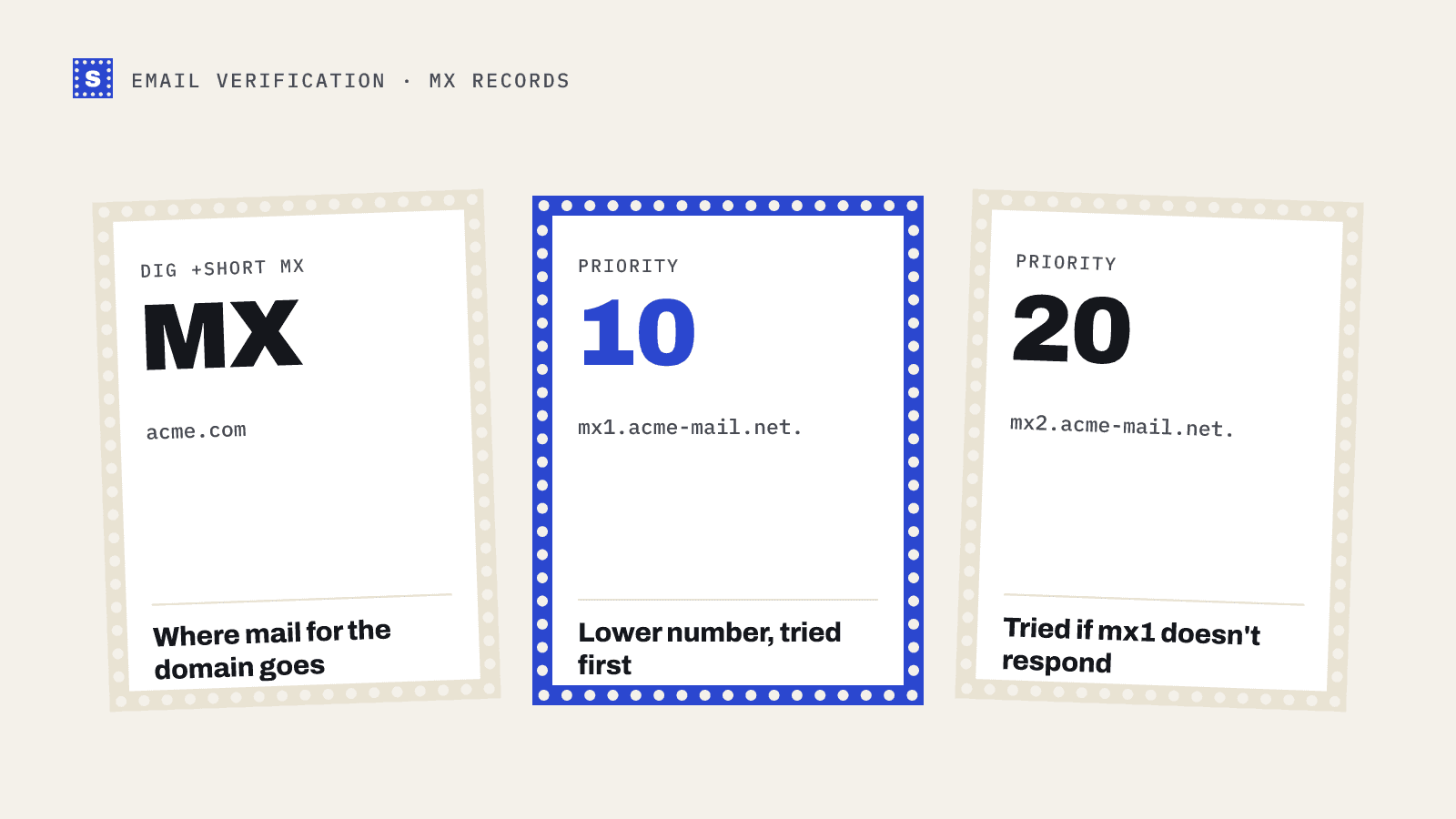
The verifier looks up the domain in DNS. Does it exist? Does it publish MX records that say which servers accept its mail? A domain with no mail server cannot receive email, and a domain that publishes a null MX record (defined in RFC 7505) is saying outright that it accepts none. Either way the address is undeliverable.
You can run this part yourself with the free MX lookup tool.
5. Probe for catch-all behaviour
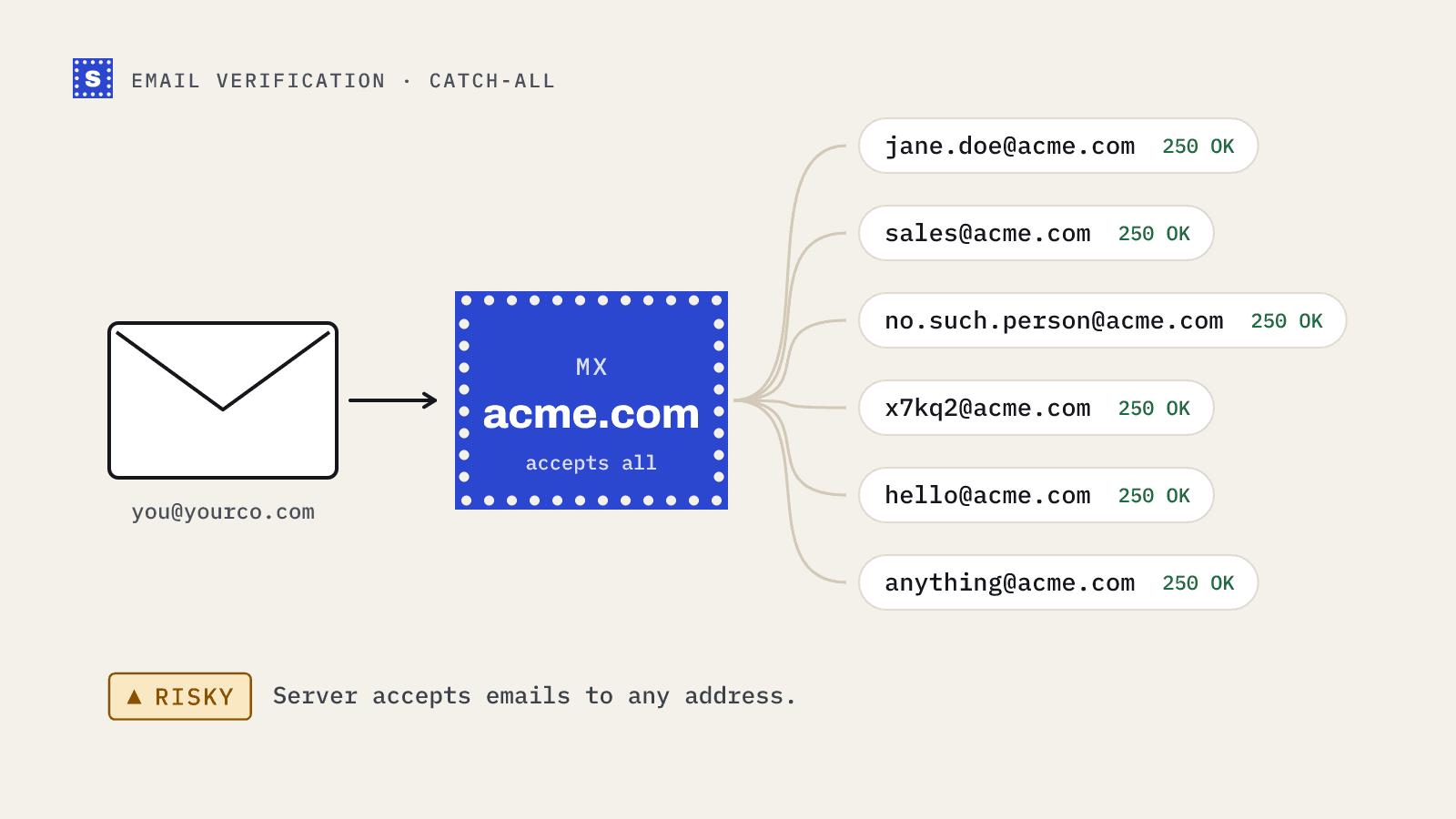
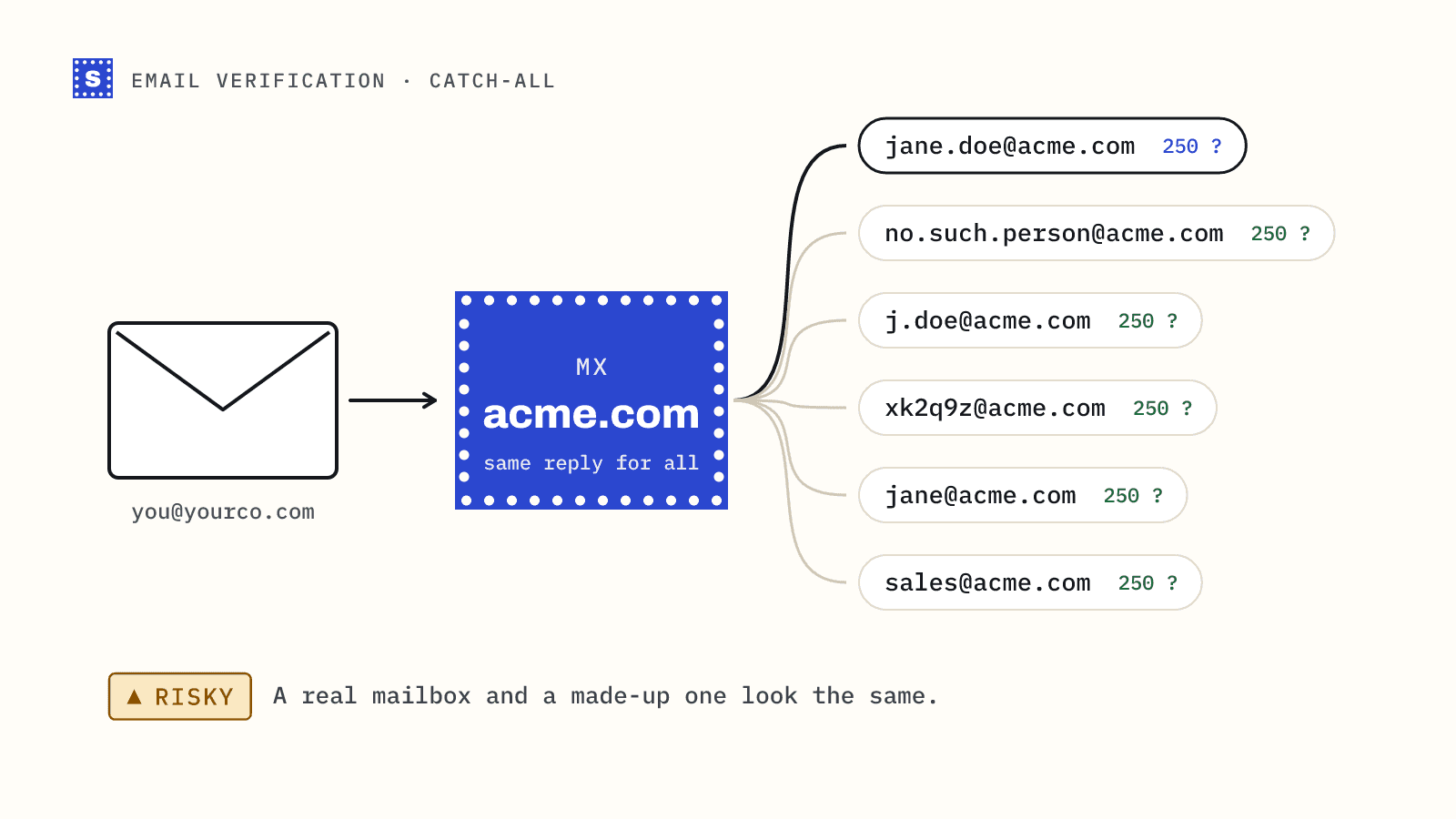
Some domains are configured to accept mail for any address at all, real or invented. To spot them, the verifier asks the server about an address that cannot exist, something like a long random string at the same domain. If the server says yes to that, it will say yes to everything, and a "yes" for your contact proves nothing. More on this in what a catch-all domain means for your list.
6. Ask the mail server about the mailbox
This is the SMTP check. The verifier connects to the domain's mail server and starts a normal delivery conversation: it introduces itself, names a sender, and names the recipient with the RCPT TO command. The server answers with a code. A 250 means it will accept mail for that recipient. A 550 with a message like "user unknown" means the mailbox doesn't exist. The verifier then ends the conversation before any message is sent.
Mail servers don't always cooperate. Some delay unknown senders on purpose (greylisting), some block anything that looks like probing, and some simply time out. Those cases lead to the less certain results described below.
7. Classify the result
Finally, the raw answer gets mapped to a category and a reason you can act on.
What the results mean
Most tools use three or four categories, though the names vary. Here is how they usually break down:
| Category | What it means | Typical reasons | What to do |
|---|---|---|---|
| Deliverable | The server confirmed the mailbox exists | Mailbox accepted | Send |
| Risky | The address may work, but nobody can confirm it | Catch-all domain, disposable, role-based, anti-spam block | Send carefully or segment |
| Undeliverable | Mail will bounce | Mailbox not found, domain has no mail server, syntax error | Remove and suppress |
| Unknown | The check couldn't finish | Server timeout, temporary failure | Recheck later |
The category alone is a blunt instrument. "Risky because the domain is catch-all" and "risky because it's a throwaway inbox" call for different decisions. That's why the reason matters as much as the label.
Where verification fits in your workflow
There are two main moments to verify.
At the point of capture. When someone types an address into a signup form, checkout or lead form, an API call can catch typos and fake addresses before they ever enter your database. This is real-time verification, and it is the cheapest place to stop bad data.
Before you send. Lists you already hold decay, and lists you buy, scrape or export from a data provider were never verified against your sending. Uploading the file to a bulk email verifier before a campaign removes the addresses that would have bounced.
For cold outreach, verify every list right before it goes into a sequence, even if the data provider says the emails are "verified". Their check may be weeks old.
What verification can't do
It's worth being clear about the limits.
- It cannot confirm a specific mailbox on a catch-all domain. Nobody can, without sending a real message.
- It doesn't detect most spam traps. Pristine traps look exactly like valid addresses.
- It doesn't fix authentication, content or sending volume problems. A perfectly clean list sent from a domain without SPF and DKIM can still land in spam.
- It's a snapshot. An address that is valid today can be deactivated next month.
None of that makes verification less useful. It just means it is one part of deliverability alongside authentication, reputation and engagement. Our email deliverability guide covers how the pieces fit together.
How SimpleCold handles it
SimpleCold runs the steps above in that order and returns Deliverable, Risky or Undeliverable with a plain-language reason for every address, so a catch-all result reads differently from a disposable one. There is no separate Unknown bucket: a server that won't confirm the address comes back Risky with the status no_response. If a domain looks misspelled, the result includes a suggested correction. When a mail server is slow, you get an answer within about 12 seconds or a processing status. The final result is usually ready within a minute or two, and collecting it any time in the next 30 minutes doesn't use another credit.
To try it on one address, use the free email checker. For a whole file, upload a CSV to the bulk email verifier; the download keeps your original columns and adds the category and reason next to each row.